과제 시작 전, 꼭 읽어보기
<aside> 1️⃣
API 실행 및 테스트
- 과제를 진행하며 여러분들이 개발한 API가 요구사항에 맞게 동작 하는지 확인하려면 API가 반환하는 반환(결과) 값을 계속해서 확인하셔야 합니다.
- 이때, 더 쉽게 확인 하실 수 있는 도구가 있는데 바로 Postman입니다.
- 사용법은 아래 페이지에서 꼭 확인해 주세요!
- Postman 사용법
</aside>
<aside> 2️⃣
DTO에 담아 반환 (Entity 그대로 반환 X)
</aside>
<aside> 3️⃣
ResponseEntity
- ResponseEntity는 Spring Framework에서 제공하는 클래스 중 하나로 HTTP 요청(Request) 또는 응답(Response)에 해당하는 HttpHeader와 HttpBody를 포함하고 있는 클래스입니다.
- HTTP 요청에 대한 응답을 처리할 때 해당 클래스를 사용하면 유연하고 편리하게 처리할 수 있습니다.Spring ResponseEntity - Using ResponseEntity in Spring Application
- Example usage for org.springframework.http ResponseEntity ok
- ResponseEntity (Spring Framework 6.0.12 API)
</aside>
개발 전, 공통 조건
<aside>
- 3 Layer Architecture에 따라 각 Layer의 목적에 맞게 개발해야 합니다.
- CRUD 필수 기능은 모두 데이터베이스 연결 및 JPA를 사용해서 개발해야 합니다.
- 일정 작성, 수정, 조회 시 반환 받은 일정 정보에 비밀번호는 제외해야 합니다.
- 일정 수정, 삭제 시 선택한 일정의 비밀번호와 요청할 때 함께 보낸 비밀번호가 일치할 경우에만 가능합니다. </aside>
Lv 0. API 명세 및 ERD 작성 필수
- [ ] API 명세서 작성하기
- [ ] API명세서는 프로젝트 root(최상위) 경로의 README.md에 작성
- 참고) API 명세서 작성 가이드
- API 명세서란 API명, 요청 값(파라미터), 반환 값, 인증/인가 방식, 데이터 및 전달 형식 등 API를 정확하게 호출하고 그 결과를 명확하게 해석하는데 필요한 정보들을 일관된 형식으로 기술한 것을 의미합니다.
- request 및 response는 json(링크) 형태로 작성합니다.
- [ ] ERD 작성하기
- [ ] ERD는 프로젝트 root(최상위) 경로의 README.md에 첨부
- API 명세 작성을 통해 서비스의 큰 흐름과 기능을 파악 하셨다면 이제는 기능을 구현하기 위해 필요한 데이터가 무엇인지 생각해봐야합니다.
- 이때, 구현해야 할 서비스의 영역별로 필요한 데이터를 설계하고 각 영역간의 관계를 표현하는 방법이 있는데 이를 ERD(Entity Relationship Diagram)라 부릅니다.
- ERD 작성간에 다음과 같은 항목들을 학습합니다.
- E(Entity. 개체)
- 구현 할 서비스의 영역에서 필요로 하는 데이터를 담을 개체를 의미합니다.
- ex) 책, 저자, 독자, 리뷰
- 구현 할 서비스의 영역에서 필요로 하는 데이터를 담을 개체를 의미합니다.
- A(Attribute. 속성)
- 각 개체가 가지는 속성을 의미합니다.
- ex) 책은 제목, 언어, 출판일, 저자, 가격 등의 속성을 가질 수 있습니다.
- 각 개체가 가지는 속성을 의미합니다.
- R(Relationship. 관계)
- 개체들 사이의 관계를 정의합니다.
- ex) 저자는 여러 권의 책을 집필할 수 있습니다. 이때, 저자와 책의 관계는 일대다(1:N) 관계입니다.
- 개체들 사이의 관계를 정의합니다.
- E(Entity. 개체)
Lv 1. 일정 생성 필수
- [ ] 일정 생성(일정 작성하기)
- [ ] 일정 생성 시, 포함되어야할 데이터
- [ ] 일정 제목, 일정 내용, 작성자명, 비밀번호, 작성/수정일을 저장
- [ ] 작성/수정일은 날짜와 시간을 모두 포함한 형태
- [ ] 각 일정의 고유 식별자(ID)를 자동으로 생성하여 관리
- [ ] 최초 생성 시, 수정일은 작성일과 동일
- [ ] 작성일, 수정일 필드는 JPA Auditing을 활용하여 적용합니다.
- [ ] API 응답에 비밀번호는 제외해야 합니다.
- [ ] 일정 생성 시, 포함되어야할 데이터
Lv 2. 일정 조회 필수
- [ ] 전체 일정 조회
- [ ] 작성자명을 기준으로 등록된 일정 목록을 전부 조회
- [ ] 작성자명은 조회 조건으로 포함될 수도 있고, 포함되지 않을 수도 있습니다.
- [ ] 하나의 API로 작성해야 합니다.
- [ ] 수정일 기준 내림차순으로 정렬
- [ ] API 응답에 비밀번호는 제외해야 합니다.
- [ ] 작성자명을 기준으로 등록된 일정 목록을 전부 조회
- [ ] 선택 일정 조회
- [ ] 선택한 일정 단건의 정보를 조회할 수 있습니다.
- [ ] 일정의 고유 식별자(ID)를 사용하여 조회합니다.
- [ ] API 응답에 비밀번호는 제외해야 합니다.
- [ ] 선택한 일정 단건의 정보를 조회할 수 있습니다.
Lv 3. 일정 수정 필수
- [ ] 선택한 일정 수정
- [ ] 선택한 일정 내용 중 일정 제목, 작성자명만 수정 가능
- [ ] 서버에 일정 수정을 요청할 때 비밀번호를 함께 전달합니다.
- [ ] 작성일은 변경할 수 없으며, 수정일은 수정 완료 시, 수정한 시점으로 변경되어야 합니다.
- [ ] API 응답에 비밀번호는 제외해야 합니다.
- [ ] 선택한 일정 내용 중 일정 제목, 작성자명만 수정 가능
Lv 4. 일정 삭제 필수
- [ ] 선택한 일정 삭제
- [ ] 선택한 일정을 삭제할 수 있습니다.
- [ ] 서버에 일정 삭제을 요청할 때 비밀번호를 함께 전달합니다.
- [ ] 선택한 일정을 삭제할 수 있습니다.
2️⃣ 도전 기능 가이드
Lv 5. 댓글 생성 도전
- [ ] 댓글 생성(댓글 작성하기)
- [ ] 일정에 댓글을 작성할 수 있습니다.
- [ ] 댓글 생성 시, 포함되어야할 데이터
- [ ] 댓글 내용, 작성자명, 비밀번호, 작성/수정일, 일정 고유식별자(ID)를 저장
- [ ] 작성/수정일은 날짜와 시간을 모두 포함한 형태
- [ ] 각 일정의 고유 식별자(ID)를 자동으로 생성하여 관리
- [ ] 최초 생성 시, 수정일은 작성일과 동일
- [ ] 작성일, 수정일 필드는 JPA Auditing을 활용하여 적용합니다.
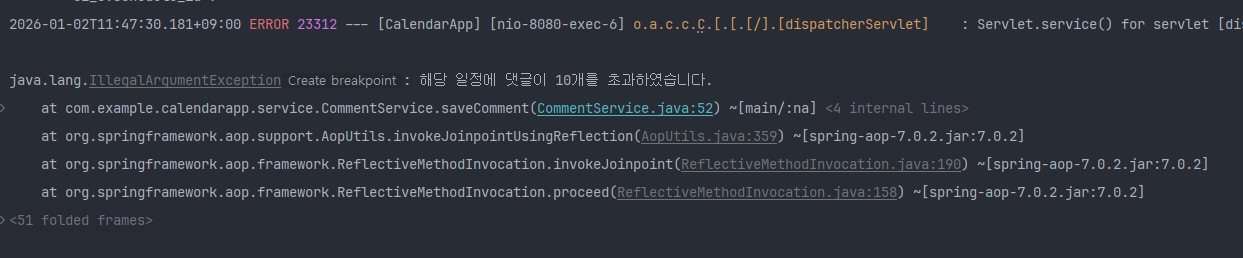
- [ ] 하나의 일정에는 댓글을 10개까지만 작성할 수 있습니다.
- [ ] API 응답에 비밀번호는 제외해야 합니다.
Lv 6. 일정 단건 조회 업그레이드 도전
- [ ] 일정 단건 조회 업그레이드
- [ ] 일정 단건 조회 시, 해당 일정에 등록된 댓글들을 포함하여 함께 응답합니다.
- [ ] API 응답에 비밀번호는 제외해야 합니다.
Lv 7. 유저의 입력에 대한 검증 수행 도전
- [ ] 설명
- [ ] 잘못된 입력이나 요청을 방지할 수 있습니다.
- [ ] 데이터의 무결성을 보장하고 애플리케이션의 예측 가능성을 높여줍니다.
- [ ] 조건
- [ ] 일정 제목은 최대 30자 이내로 제한, 필수값 처리
- [ ] 일정 내용은 최대 200자 이내로 제한, 필수값 처리
- [ ] 댓글 내용은 최대 100자 이내로 제한, 필수값 처리
- [ ] 비밀번호, 작성자명은 필수값 처리
1.3 Layer Architecture(Controller, Service, Repository)를 적절히 적용했는지 확인해 보고, 왜 이러한 구조가 필요한지 작성해 주세요.
1.역할분담-> 클래스를 분리하여 유지보수성을 높인다
2.테스트의 용이성 -> 에러가 발생시 해당 계층만 분리하여 테스트를 할수있다.
3.중복 코드방지 -> 일정 존재 여부와 같은 로직을 여기저기 사용하다 보니, 서비스 계층에 만들어두면 호출하여 재사용성이 높아진다
2.@RequestParam, @PathVariable, @RequestBody가 각각 어떤 어노테이션인지, 어떤 특징을 갖고 있는지 작성해 주세요.
@RequestParam -> URL 끝에 ?뒤에 key=value 형태로 데이터를 붙여 보내는 방식, 검색/필터링/정렬에 사용
특징 : 데이터가 URL에 다보인다, 필수가 아닌 값(required = false)이나 기본값(defaultValue) 설정이 자유롭다
@PathVariable -> URL의 일부를 변수값으로 사용하는 방식 / Id 와 같이
특징 : URL 경로에 데이터가 직접 노출, 주로 ID 값을 넘길 때 가장 많이 사용
@RequestBody -> HTTP 요청의 Body에 데이터를 담아 보내는 방식, 생성(POST)이나 수정(PUT) 사용
특징 : URL에 데이터가 보이지 않아 보안상 유리, 객체(DTO)로 바로 변환
controller
CommentController
package com.example.calendarapp.controller;

import com.example.calendarapp.dto.CommentRequestDto;
import com.example.calendarapp.dto.CommentResponseDto;
import com.example.calendarapp.dto.ScheduleRequestDto;
import com.example.calendarapp.dto.ScheduleResponseDto;
import com.example.calendarapp.service.CommentService;
import com.example.calendarapp.service.ScheduleService;
import lombok.RequiredArgsConstructor;
import org.springframework.web.bind.annotation.PostMapping;
import org.springframework.web.bind.annotation.RequestBody;
import org.springframework.web.bind.annotation.RequestMapping;
import org.springframework.web.bind.annotation.RestController;

@RestController
@RequestMapping("/api/comments")
@RequiredArgsConstructor
public class CommentController {
    private final CommentService commentService; // 주방장(Service) 호출 준비

    //댓글 생성
    @PostMapping
    public CommentResponseDto createCount(@RequestBody CommentRequestDto requestDto) {
        return commentService.saveComment(requestDto);
    }
}
ScheduleController
package com.example.calendarapp.controller;

import com.example.calendarapp.dto.ScheduleRequestDto;
import com.example.calendarapp.dto.ScheduleResponseDto;
import com.example.calendarapp.entity.Schedule;
import com.example.calendarapp.service.ScheduleService;
import lombok.RequiredArgsConstructor;
import org.springframework.http.HttpStatus;
import org.springframework.http.ResponseEntity;
import org.springframework.web.bind.annotation.*;

import java.util.List;

@RestController // JSON 형태로 응답을 보낼 때 사용//클라이언트가 제이슨으로 받아야 구현이 가능하기 때문
@RequestMapping("/api/schedules") // 공통 경로 설정//외부에서 api를 접근하는 경로(여기로 보내 주세요)
@RequiredArgsConstructor // 생성자 주입을 위해 사용 (Service 연결용)//new없이 사용하기위해서
//의존성의 문제인데 @RequiredArgsConstructor 없이 new해서 생성하게 되면, 스프링 관리를 벗어난 야생의 객체가 되고 문제시 스프링의 관리밖의
//영역의 문제가 발생하게 되고, 트렌젝션시 적용되지 않는 문제도 발생
public class ScheduleController {
    private final ScheduleService scheduleService; // 주방장(Service) 호출 준비

    //스케줄 생성
    @PostMapping
    public ScheduleResponseDto createSchedule(@RequestBody ScheduleRequestDto requestDto) {
        //@RequestBody는 요청온 내용이 스케줄요청디티오 타입의 리퀘스트 디티오이다
        //클라이언트가 http 바디라는 상자에서 스프링이 이 상자를 뜯어서 ScheduleRequestDto양식에 맞춰 쏙쏙 넣어준다
        // 매니저(Controller)는 주문(DTO)을 받아서 주방장(Service)에게 넘깁니다.
        return scheduleService.saveSchedule(requestDto);
    }
    //스케줄생성이라는 메소드를 스케줄응답디티오 타입으로 반환을 할건데,
    //필요한 매개변수가, 스케줄요청디티오 타입형태의 리퀘스트디티오를 받아서
    //스케줄서비스 클래스의 세이브스캐줄 메서드를 실행하는 매개변수로 던저주면서 이 메서드는 끝이난다
    //응답타입으로 메소드를 정의하는 이유는 최종 레퍼지토리를 다녀온 데이터를 클라이언트까지 다시 전달하기 위해서

    //스케줄 단건 조회
    @GetMapping("/{scheduleId}")//이런식의 주소로 Get이 온다면 이 메서드로 처리 하겠다는 뜻
    public ResponseEntity<ScheduleResponseDto> getOneSchedule(@PathVariable Long scheduleId){
        //ResponseEntity 봉투에 ScheduleResponseDto 내용을 담아 돌려주는 getOneSchedule메서드 라는뜻
        //ResponseEntity인 이유는 단순히 데이터만 주는 게 아니라, "성공(200 OK)" 같은 상태 코드까지 깔끔하게 포장해서 보내기 위해서
        //@PathVariable는 주소창에 써진 {scheduleId} 값을 가져와서 Long scheduleId 여기에 담으라는 뜻
        ScheduleResponseDto result = scheduleService.getOneSchedule(scheduleId);
        //scheduleService 클래스에 getOneSchedule메서드를 scheduleId값을 넣어 실행하고 결과를 result에 담아라
        return ResponseEntity.status(HttpStatus.OK).body(result);
        //body(result)결과물을 status(HttpStatus.OK)를 표시하여 ResponseEntity봉투에 담아 클라이언트에세 응답을 줘라
    }

    //스케줄 다건 조회(생성자 이름 기준으로)
    @GetMapping
    //[문제] @GetMapping("/search/{username}") 작성해두고 @RequestParam(required = false) 이렇게 처리를 요구함
    //그래서 포스트맨 테스트시 404에러 발생
    //[해결]("/search/{username}") 지우고, 포스트맨 호출 주소값을
    //http://localhost:8080/api/schedules?username=전민우 (이름이 있는경우)
    //http://localhost:8080/api/schedules(이름이 없는경우)로 해결을 완료
    public List<ScheduleResponseDto> getFindUserNameSchedule(
            @RequestParam(required = false) String username//이름이 없어도 에러가 나지 않도록 처리
    ){
        return scheduleService.getUserNameSchedule(username);
    }

    //스케줄 수정
    @PutMapping("/{scheduleId}") // 수정을 원하는 일정의 ID를 경로로 받음
    public ScheduleResponseDto updateSchedule(
            @PathVariable Long scheduleId,
            @RequestBody ScheduleRequestDto request // 수정할 내용 + 비밀번호를 Body로 받음
    ){
        return scheduleService.updateSchedule(scheduleId, request);
    }

    //스케줄 삭제
    @DeleteMapping("/{scheduleId}")
    public void deleteSchedule(
            @PathVariable Long scheduleId,
            @RequestBody ScheduleRequestDto request //비밀번호를 Body로 받음
    ){
        scheduleService.deleteSchedule(scheduleId,request);
    }
}
DTO
CommentRequestDto
package com.example.calendarapp.dto;

import jakarta.validation.constraints.NotBlank;
import jakarta.validation.constraints.NotNull;
import jakarta.validation.constraints.Size;
import lombok.Getter;

@Getter
public class CommentRequestDto {
    @NotBlank(message = "내용은 필수입니다.")
    @Size(max = 100, message = "내용은 최대 100자 이내여야 합니다.")
    private String content;
    @NotBlank(message = "작성자명을 입력해주세요")
    private String username;
    @NotBlank(message = "패스워드를 입력해주세요")
    private String password;
    @NotNull
    private Long scheduleId;
}
CommentResponseDto
package com.example.calendarapp.dto;

import com.example.calendarapp.entity.Comment;
import lombok.Getter;

import java.time.LocalDateTime;

@Getter
public class CommentResponseDto {
    private Long id;
    private String content;
    private String username;
    private Long scheduleId;
    private LocalDateTime createdAt;
    private LocalDateTime updatedAt;

    public CommentResponseDto(Comment comment) {
        this.id = comment.getId();
        this.content = comment.getContent();
        this.username = comment.getUsername();
        this.createdAt = comment.getCreatedAt();
        this.updatedAt = comment.getUpdatedAt();
        //this.scheduleId= comment.getScheduleId();

        //Comment에 scheduleId라는 필드가 없음으로, 연결된 schedule 객체에서 Id를 가져온다
        if(comment.getSchedule() != null) {
            this.scheduleId = comment.getSchedule().getId();
        }
    }
}
ScheduleRequestDto
package com.example.calendarapp.dto;

import jakarta.validation.constraints.NotBlank;
import jakarta.validation.constraints.Size;
import lombok.Getter;

@Getter
public class ScheduleRequestDto {//클라이언트가 보낸 주문서
    @NotBlank(message = "제목은 필수입니다.") // null, "", " " 모두 방어
    @Size(max = 30, message = "제목은 최대 30자 이내여야 합니다.")
    private String title;
    @NotBlank(message = "내용은 필수입니다.")
    @Size(max = 200, message = "내용은 최대 200자 이내여야 합니다.")
    private String content;
    @NotBlank(message = "작성자명은 필수입니다.")
    private String username;
    @NotBlank(message = "비밀번호를 입력해주세요.")
    private String password;
}
ScheduleResponseDto
package com.example.calendarapp.dto;

import com.example.calendarapp.entity.Schedule;
import lombok.Getter;

import java.time.LocalDateTime;
import java.util.ArrayList;
import java.util.List;

@Getter
public class ScheduleResponseDto {
    private Long id;
    private String title;
    private String content;
    private String username;
    private LocalDateTime createdAt;
    private LocalDateTime updatedAt;

    private List<CommentResponseDto> comments;//댓글을 담을 배열상자 준비

    public ScheduleResponseDto(Schedule schedule,List<CommentResponseDto> comments) {
        this.id = schedule.getId();//DB에서 생성된 아이디 번호 담아서 응답보내기
        this.title = schedule.getTitle();
        this.content = schedule.getContent();
        this.username = schedule.getUsername();
        this.createdAt = schedule.getCreatedAt();
        this.updatedAt = schedule.getUpdatedAt();
        //패스워드는 포함하지 않는다.
        this.comments = comments;
    }
}
emtity
Comment
package com.example.calendarapp.entity;

import jakarta.persistence.*;
import lombok.AccessLevel;
import lombok.Getter;
import lombok.NoArgsConstructor;
import org.springframework.data.annotation.CreatedDate;
import org.springframework.data.annotation.LastModifiedDate;
import org.springframework.data.jpa.domain.support.AuditingEntityListener;

import java.time.LocalDateTime;
@Entity
@Getter
@EntityListeners(AuditingEntityListener.class)
@NoArgsConstructor(access = AccessLevel.PROTECTED)
public class Comment {
    @Id
    @GeneratedValue(strategy = GenerationType.IDENTITY)
    private Long id;

    @Column(nullable = false, length = 100)
    private String content;
    @Column(nullable = false)
    private String username;
    @Column(nullable = false)
    private String password;
    //private Long scheduleId;
    @ManyToOne(fetch = FetchType.LAZY)//다대일 설정
    //[의문] 다대일이라는 내용을 Schedule 엔티티에 작성하는게 맞지 않나?
    //외래키(FK)를 가진 쪽이 주도권이 있음으로 여기에 다대일이라고 작성해주기
    @JoinColumn(name = "schedule_id") // DB 테이블에 생길 외래키 컬럼명
    private Schedule schedule;

    @CreatedDate
    @Column(updatable = false)//생성일은 수정될수 없다
    private LocalDateTime createdAt;
    @LastModifiedDate
    private LocalDateTime updatedAt;

    public Comment(String content, String username, String password, Schedule schedule) {
        //id는 DB에서 할당
        this.content = content;
        this.username = username;
        this.password = password;
        this.schedule = schedule;
        //생성자에 날짜와 시간을 수동으로 설정해줄 필요가 없다.(JPA Auditing이 해줌)
//        @LocalDateTime
//        this.createAt = LocalDateTime.now();
//        @LocalDateTime
//        this.updateAt = LocalDateTime.now();
    }

    //업데이트는 프레임워크에게 맡기는게 아닌, 개발자의 의도와 더티체킹, 캡슐화 목적으로 업데이트 메서드는 직접 구현
    public void commentUpdate(String content) {
        this.content = content;
    }
}
Schedule
package com.example.calendarapp.entity;


import jakarta.persistence.*;
import lombok.AccessLevel;
import lombok.Getter;
import lombok.NoArgsConstructor;
import org.springframework.data.annotation.CreatedDate;
import org.springframework.data.annotation.LastModifiedDate;
import org.springframework.data.jpa.domain.support.AuditingEntityListener;
import org.springframework.data.jpa.repository.config.EnableJpaAuditing;

import java.time.LocalDateTime;
import java.time.LocalTime;
import java.util.ArrayList;
import java.util.List;

@Entity
@Getter
@EntityListeners(AuditingEntityListener.class)
@NoArgsConstructor(access = AccessLevel.PROTECTED)
public class Schedule {
    @Id
    @GeneratedValue(strategy = GenerationType.IDENTITY)
    private Long id;
    // 1. 제목: 필수(nullable=false), 길이 30자(length=30)
    @Column(nullable = false, length = 30)
    private String title;
    // 2. 내용: 필수, 길이 200자
    @Column(nullable = false, length = 200)
    private String content;
    // 3. 작성자명: 필수
    @Column(nullable = false)
    private String username;
    // 4. 비밀번호: 필수
    @Column(nullable = false)
    private String password;

    //일대다 설정
    //Schedule 엔티티는 Comment 엔티티를 Owner 로 인식
    @OneToMany(mappedBy = "schedule", cascade = CascadeType.ALL, orphanRemoval = true)
    private List<Comment> comments = new ArrayList<>();

    @CreatedDate
    @Column(updatable = false)//생성일은 수정될수 없다
    private LocalDateTime createdAt;
    @LastModifiedDate
    private LocalDateTime updatedAt;

    public Schedule(String title, String content, String username, String password) {
        //id는 DB에서 할당
        this.title = title;
        this.content = content;
        this.username = username;
        this.password = password;
        //생성자에 날짜와 시간을 수동으로 설정해줄 필요가 없다.(JPA Auditing이 해줌)
//        @LocalDateTime
//        this.createAt = LocalDateTime.now();
//        @LocalDateTime
//        this.updateAt = LocalDateTime.now();
    }

    //업데이트는 프레임워크에게 맡기는게 아닌, 개발자의 의도와 더티체킹, 캡슐화 목적으로 업데이트 메서드는 직접 구현
    public void update(String title, String content) {
        this.title = title;
        this.content = content;
    }
}
repository
CommentRepository
package com.example.calendarapp.repository;

import com.example.calendarapp.dto.CommentResponseDto;
import com.example.calendarapp.entity.Comment;
import com.example.calendarapp.entity.Schedule;
import org.springframework.data.jpa.repository.JpaRepository;
import org.springframework.stereotype.Repository;

import java.util.List;

@Repository
public interface CommentRepository extends JpaRepository<Comment,Long> {
    long countByScheduleId(Long scheduleId);//Comment 저장소에서 특정 scheduleId를 가진 데이터가 몇개인지 세어줘라

    List<Comment> findByScheduleId(Long scheduleId);//특정 일정의 모든 댓글을 리스트형태로 가져와라

}
ScheduleRepository
package com.example.calendarapp.repository;

import com.example.calendarapp.entity.Schedule;
import org.springframework.data.jpa.repository.JpaRepository;
import org.springframework.stereotype.Repository;

import java.util.List;

@Repository//사용함으로 데이터를 수정 조회 생성이 가능하다
public interface ScheduleRepository extends JpaRepository<Schedule,Long> {
    //이게 스케줄 객체와(각종 필드와 메서드를 통한 결과물) 디비 생성 id 를 넘기고 받는다라는 뜻
}
service
CommentService
package com.example.calendarapp.service;

import com.example.calendarapp.dto.CommentRequestDto;
import com.example.calendarapp.dto.CommentResponseDto;
import com.example.calendarapp.dto.ScheduleRequestDto;
import com.example.calendarapp.dto.ScheduleResponseDto;
import com.example.calendarapp.entity.Comment;
import com.example.calendarapp.entity.Schedule;
import com.example.calendarapp.repository.CommentRepository;
import com.example.calendarapp.repository.ScheduleRepository;
import lombok.RequiredArgsConstructor;
import org.springframework.stereotype.Service;
import org.springframework.transaction.annotation.Transactional;

@Service // 이 클래스가 "주방장(Service)"임을 스프링에게 알림
@RequiredArgsConstructor // Repository를 주입받기 위해 사용
public class CommentService {
    private final CommentRepository commentRepository;//댓글 창고 관리자 호출
    private final ScheduleRepository scheduleRepository;//일정 창고 관리자 호출

    /*
    //검증
    private void validateCommentRequest(CommentRequestDto dto) {
        // 필수값(NotBlank) 검증
        if (dto.getContent() == null || dto.getContent().trim().isEmpty()) {
            throw new IllegalArgumentException("내용은 필수입니다.");
        }
        if (dto.getPassword() == null || dto.getPassword().trim().isEmpty()) {
            throw new IllegalArgumentException("패스워드를 입력해주세요");
        }
        if (dto.getUsername() == null || dto.getUsername().trim().isEmpty()) {
            throw new IllegalArgumentException("작성자명을 입력해주세요");
        }

        // 글자수(Size) 검증
        if (dto.getContent().length() > 100) {
            throw new IllegalArgumentException("내용은 최대 100자 이내여야 합니다.");
        }
    }
     */

    //댓글 생성
    @Transactional//트렌젝션 단위로 묶기
    public CommentResponseDto saveComment(CommentRequestDto requestDto) {
        //validateCommentRequest(requestDto);//검증

        //아이디만 확인하고 끝나는게 아니라, 실제 Schedule 객체를 가져온다
        Schedule schedule = scheduleRepository.findById(requestDto.getScheduleId()).orElseThrow(
                ()-> new IllegalArgumentException("해당 일정이 존재하지 않습니다.")
        );

        /*//댓글 달기전에 해당 일정이 있는지 확인하기
        scheduleRepository.findById(requestDto.getScheduleId()).orElseThrow(
                () ->new IllegalArgumentException("해당 일정이 존재하지 않습니다.")
        );*/

        //해당 일정에 댓글이 10개 미만인지 확인하기
        Long count = commentRepository.countByScheduleId(requestDto.getScheduleId());
        if (count >= 10) {
            throw new IllegalArgumentException("해당 일정에 댓글이 10개를 초과하였습니다.");
        }

        // 1. [요리 시작] 사용자가 준 접시(DTO)에서 재료를 꺼내 실제 식재료(Entity)를 만듭니다.
        Comment comment = new Comment(
                requestDto.getContent(),
                requestDto.getUsername(),
                requestDto.getPassword(),
                schedule//객체 자체를 넘기는걸로 변경
        );
        // 2. [창고 저장] 창고 관리자에게 식재료를 보관하라고 시킵니다.
        // 이때 DB가 ID와 생성/수정 시간을 자동으로 채워준 완성본을 돌려줍니다.
        Comment savedComment = commentRepository.save(comment);

        // 3. [서빙 준비] 완성된 식재료를 다시 예쁜 접시(Response DTO)에 담아 매니저(Controller)에게 전달합니다.
        return new CommentResponseDto(savedComment);
    };

}
ScheduleService
package com.example.calendarapp.service;

import com.example.calendarapp.dto.CommentResponseDto;
import com.example.calendarapp.dto.ScheduleRequestDto;
import com.example.calendarapp.dto.ScheduleResponseDto;
import com.example.calendarapp.entity.Comment;
import com.example.calendarapp.entity.Schedule;
import com.example.calendarapp.repository.CommentRepository;
import com.example.calendarapp.repository.ScheduleRepository;
import lombok.RequiredArgsConstructor;
import org.apache.catalina.User;
import org.springframework.stereotype.Service;
import org.springframework.transaction.annotation.Transactional;

import java.util.ArrayList;
import java.util.List;

import static aQute.bnd.annotation.headers.Category.users;

@Service // 이 클래스가 "주방장(Service)"임을 스프링에게 알림
@RequiredArgsConstructor // Repository를 주입받기 위해 사용
public class ScheduleService {

    private final ScheduleRepository scheduleRepository;//창고 관리자 호출
    private final CommentRepository commentRepository;
    //Request 와 DB에 2중으로 검증 구현
    //아래 로직을 살려서 3중으로 검증을 구현할수 있지만. 유지보수 측면에서는 어노테이션을 활용한 2군데에서만 검증하는걸로
    /*
    //검증
    private void validateScheduleRequest(ScheduleRequestDto dto) {
        // 필수값(NotBlank) 검증
        if (dto.getTitle() == null || dto.getTitle().trim().isEmpty()) {
            throw new IllegalArgumentException("제목은 필수입니다.");
        }
        if (dto.getContent() == null || dto.getContent().trim().isEmpty()) {
            throw new IllegalArgumentException("내용은 필수입니다.");
        }
        if (dto.getPassword() == null || dto.getPassword().trim().isEmpty()) {
            throw new IllegalArgumentException("패스워드를 입력해주세요");
        }
        if (dto.getUsername() == null || dto.getUsername().trim().isEmpty()) {
            throw new IllegalArgumentException("작성자명을 입력해주세요");
        }

        // 글자수(Size) 검증
        if (dto.getTitle().length() > 30) {
            throw new IllegalArgumentException("제목은 최대 30자 이내여야 합니다.");
        }
        if (dto.getContent().length() > 200) {
            throw new IllegalArgumentException("내용은 최대 200자 이내여야 합니다.");
        }
    }
    */

    //생성
    @Transactional//트렌젝션 단위로 묶기
    public ScheduleResponseDto saveSchedule(ScheduleRequestDto requestDto) {
        //validateScheduleRequest(requestDto);//검증
        // 1. [요리 시작] 사용자가 준 접시(DTO)에서 재료를 꺼내 실제 식재료(Entity)를 만듭니다.
        Schedule schedule = new Schedule(
                requestDto.getTitle(),
                requestDto.getContent(),
                requestDto.getUsername(),
                requestDto.getPassword()
        );
                // 2. [창고 저장] 창고 관리자에게 식재료를 보관하라고 시킵니다.
                // 이때 DB가 ID와 생성/수정 시간을 자동으로 채워준 완성본을 돌려줍니다.
                Schedule savedSchedule = scheduleRepository.save(schedule);

        // 3. [서빙 준비] 완성된 식재료를 다시 예쁜 접시(Response DTO)에 담아 매니저(Controller)에게 전달합니다.
        return new ScheduleResponseDto(savedSchedule,new ArrayList<>());//빈리스트 반환으로 타입형태 맞춰주기
    };
    //단건 조회
    @Transactional(readOnly = true)
    public ScheduleResponseDto getOneSchedule(Long scheduleId) {
        Schedule schedule = scheduleRepository.findById(scheduleId).orElseThrow(
                ()->new IllegalArgumentException("해당하는 스케줄이 없습니다.")//일정이 없으면
        );
        //comment 엔티티 리스트 가져오기
        List<Comment> commentsList = commentRepository.findByScheduleId(scheduleId);

        //엔티티 리스트를 하나씩 꺼내어서 DTO 타입으로 변환하여 리스트 다시만들기
        List<CommentResponseDto> commentResponseDtos = commentsList.stream()
                .map(comment->new CommentResponseDto(comment))
                .toList();
        //합쳐서 반환
        return new ScheduleResponseDto(schedule, commentResponseDtos);
    }
    //다건 조회
    @Transactional(readOnly = true)
    public List<ScheduleResponseDto> getUserNameSchedule(String username) {
        // 1. 일단 창고에 있는 모든 일정을 다 가져와
        List<Schedule> allSchedules = scheduleRepository.findAll();

        // 2. 결과를 담을 빈 접시(리스트)를 준비하고
        List<ScheduleResponseDto> dtos = new ArrayList<>();

        // 3. 하나씩 꺼내서 똑같은 이름을 찾는다.
        if(username != null) {//이름이 널이 아니면 로직을 실행해라
            for (Schedule schedule : allSchedules) {//allSchedules든 내용을 하나씩 꺼내서 schedule여기에 잠시담아서 로직 수행
                if (schedule.getUsername().equals(username)) { // 이름이 같으면
                    dtos.add(new ScheduleResponseDto(schedule,new ArrayList<>())); // 접시에 담기
                }
            }
        }else{//이름이 없으면 입력하라고 해
            for (Schedule schedule : allSchedules) {
                dtos.add(new ScheduleResponseDto(schedule,new ArrayList<>())); // 접시에 담기
            }
            dtos.sort((a, b) -> b.getUpdatedAt().compareTo(a.getUpdatedAt()));
            //b의 시간이 a보다 뒤면 앞으로 보내[이게 제일 어려웠다......]
            return dtos;
        }

        // 4. 만약 다 뒤졌는데 하나도 없다면 예외를 던져
        if (dtos.isEmpty()) {//내용물이 있는지?
            throw new IllegalArgumentException("일치하는 작성자의 게시글이 없습니다.");
        }
        dtos.sort((a, b) -> b.getUpdatedAt().compareTo(a.getUpdatedAt()));
        return dtos;
    }

    //수정
    @Transactional
    public ScheduleResponseDto updateSchedule(Long scheduleId, ScheduleRequestDto request) {
        //validateScheduleRequest(request);//검증
        //더티 체킹
        //DB에서 일치하는 스케줄을 가져온다.
        Schedule schedule = scheduleRepository.findById(scheduleId).orElseThrow(
                ()->new IllegalArgumentException("없는 스케줄 입니다.")//값이 없다면 오류 출력
        );
        if(!schedule.getPassword().equals(request.getPassword())) {//패스워드가 일치하지 않으면 오류출력
            //DB에 있는 패스워드와 입력한 패스워드가 일치하는지
            throw new IllegalArgumentException("패스워드가 일치하지 않습니다.");
        }else{//일치하면 업데이트 실시
            schedule.update(
                    request.getTitle(),
                    request.getContent()
            );
        }
        return new ScheduleResponseDto(schedule,new ArrayList<>());
        //[문제] 단건조회 수정후 컴파일러 에러가 연속적으로 발생
        //[해결]단건조희시 해당 일정의 댓글까지 보여지게 수정하면서, ScheduleResponseDto의 반환 타입이 추가되어, 추가된 타입의 형태를
        //없는경우 빈리스트로 반환하여, 타입을 충족시키게 해서 오류들을 해결
    }

    //삭제
    @Transactional
    public void deleteSchedule(Long scheduleId, ScheduleRequestDto request) {
        Schedule schedule = scheduleRepository.findById(scheduleId).orElseThrow(
                ()->new IllegalArgumentException("없는 스케줄 입니다.")//값이 없다면 오류 출력
        );
        if(schedule.getPassword().equals(request.getPassword())) {
            //스케줄이 있고, 패스워드가 일치하는 경우->삭제가 가능하다
            scheduleRepository.deleteById(scheduleId);
        }else{//스케줄은 있으나 패스워드가 일치하지 않는경우
            throw new IllegalArgumentException("패스워드가 일치 하지 않습니다.");
        }
    }
}
[아래 아쉬운점 코드 반영 완료]
아쉬운점 :
1.엔티티에 아래와 같이 일대다 다대일 설정을 통해 다양한 기능을 활용이 가능했으나, 그러지 못하고 수동으로 구성된점이 아쉽다.
@OneToMany
@ManyToOne(fetch = FetchType.LAZY) // 여러 댓글이 하나의 일정에 달림
@JoinColumn(name = "schedule_id") // DB 테이블의 외래키(FK) 컬럼명
2.아래와 같이 컬럼에 규칙을 설정하여 검증을 했으면 좋았을것 같다.
->어떤경우 앞의 로직을 무시하고 데이터베이스로 바로 들어오는 경우 방어가 가능하다
@Column(nullable = false, length = 30) 제목 필수 길이 30자
3.아래와 같이 제일 처음 값이 들어오는 RequestDto 에서 값을 검증 해버리면 뒤에 로직이 좀더 간결할수 있었을것 같다.
@NotBlank(message = "제목은 필수입니다.")
@Size(max = 30, message = "제목은 30자 이내여야 합니다.")
<실 행 결 과>
일정 등록

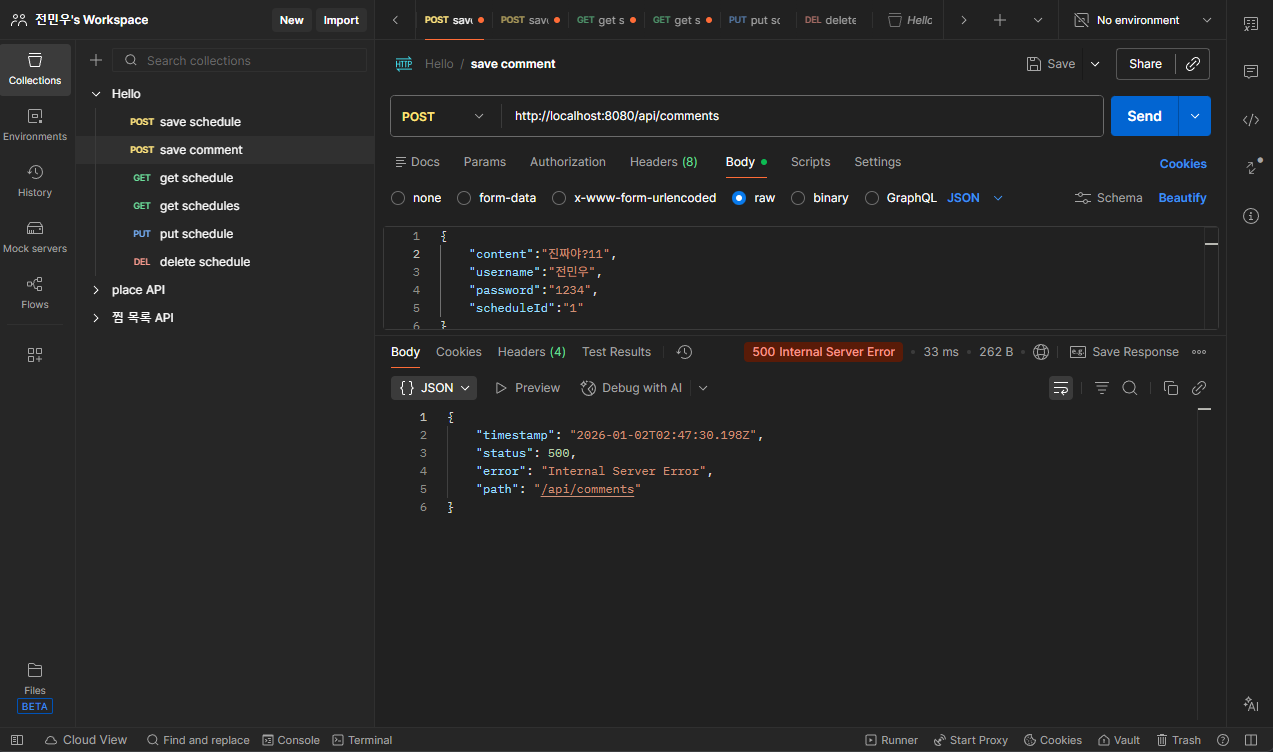
댓글 생성 11번째 실패
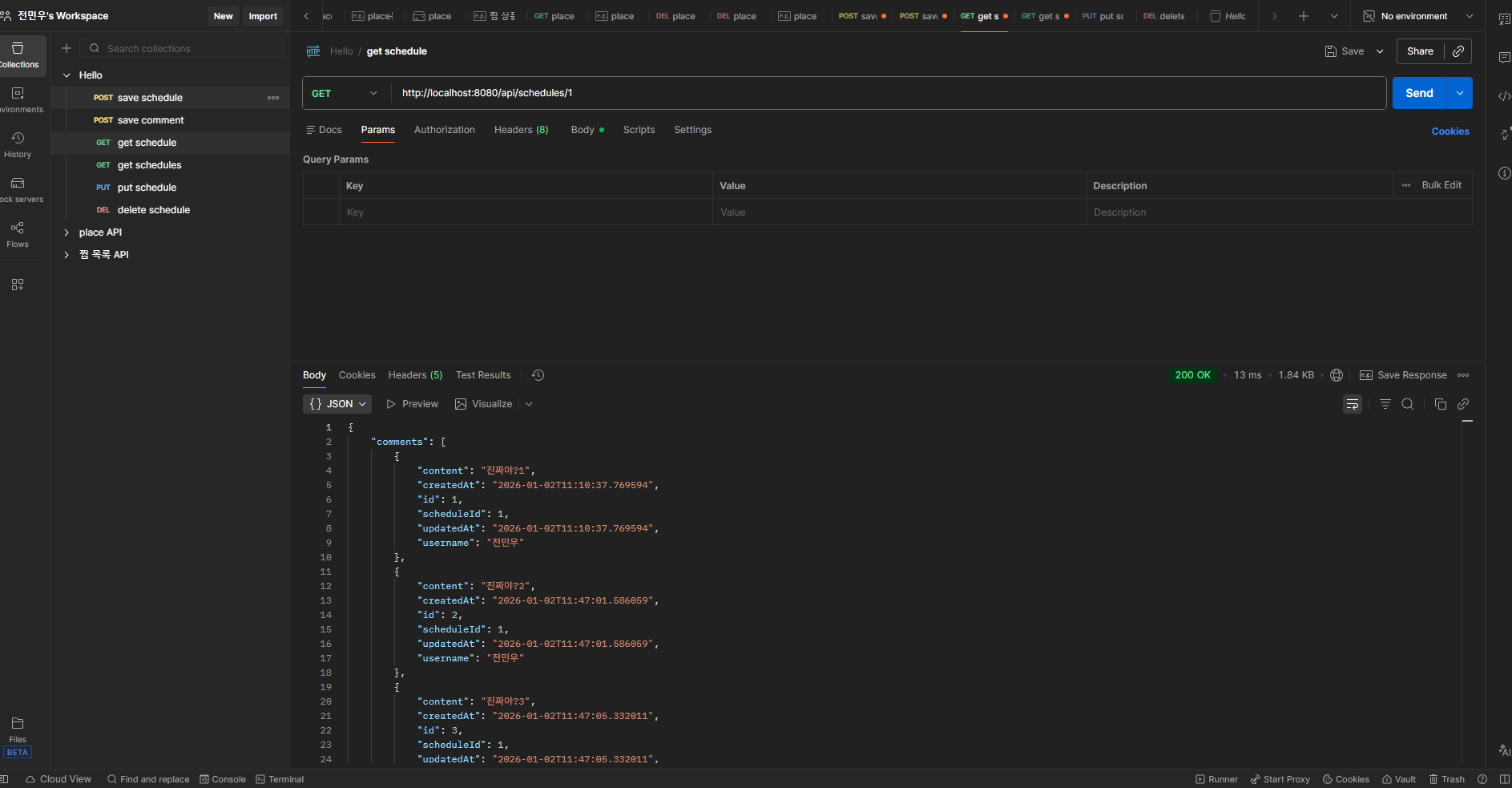
단건 조회 (단건 조회시 관련 댓글도 함께 응답)

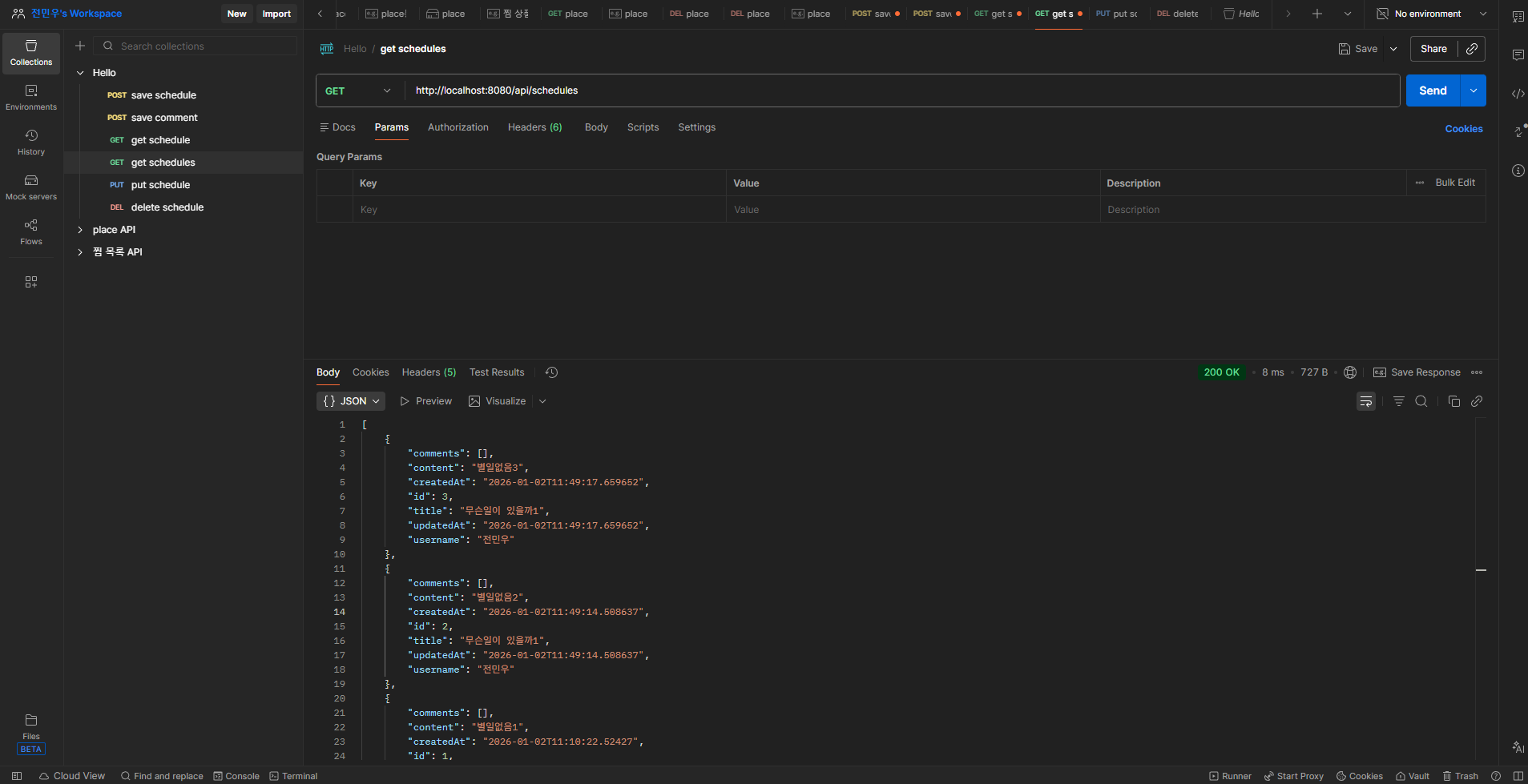
다건 조회 (이름으로 조회시 내림차순 정렬)

다건 조회 (이름이 없는경우)
수정
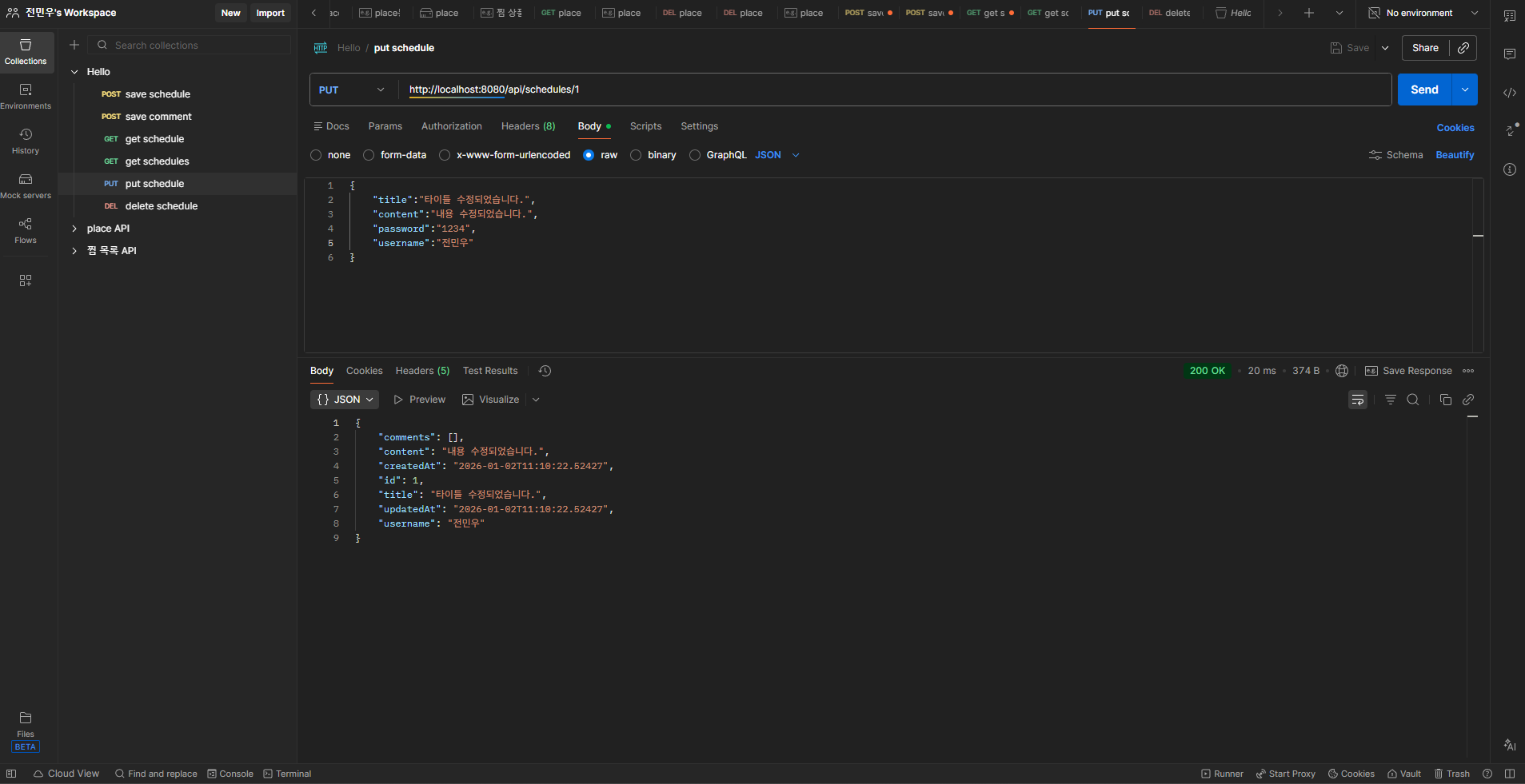
삭제

'spring_2기[본캠프] > 과제' 카테고리의 다른 글
| [과제]일정 관리 앱 2 구현 (0) | 2026.01.12 |
|---|---|
| [과제]일정관리앱 2 트러블 슈팅 (0) | 2026.01.09 |
| [달리기반 과제] 4회차 과제 (0) | 2025.12.23 |
| [라이브 코딩테스트] (0) | 2025.12.23 |
| [과제] 커머스3 (필수기능 완료 + 도전레벨3) (0) | 2025.12.22 |