STEP 1. 객체 지향 설계를 적용해 상품 관리 시스템을 프로그래밍해보자
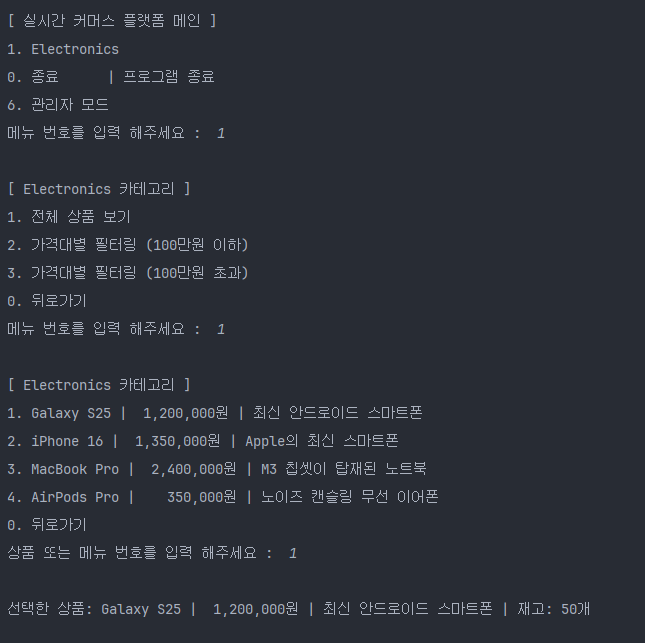
- [ ] 상품 목록 출력
- [ ] JAVA 프로그램을 실행하면 여러 전자제품을 출력합니다.
- [ ] 제시된 상품 중 입력받은 숫자에 따라 다른 로직을 실행하는 코드를 작성합니다.
- [ ] Product 클래스 생성하기
- [ ] 설명 : 개별 상품을 관리하는 클래스입니다. 현재는 전자제품만 관리합니다.
- [ ] 클래스는 상품명, 가격, 설명, 재고수량 필드를 갖습니다.
- [ ] main 함수에서 Product 클래스를 생성하여 상품 목록을 추가합니다.
- [ ] Product 객체 생성을 통해 상품명, 가격, 설명, 재고수량을 세팅합니다.
- [ ] 키워드: new
- [ ] List를 선언하여 여러 Product을 추가합니다.
- [ ] List<Product> products = new ArrayList<>();
- [ ] 반복문을 활용해 products를 탐색하면서 하나씩 접근합니다.
- [ ] Product 객체 생성을 통해 상품명, 가격, 설명, 재고수량을 세팅합니다.
STEP 2. 객체 지향 설계를 적용해 순서 제어를 클래스로 관리하기
- [ ] CommerceSystem 클래스 생성하기
- [ ] 설명: 커머스 플랫폼의 상품을 관리하고 사용자 입력을 처리하는 클래스입니다.
- [ ] Product를 관리하는 리스트가 필드로 존재합니다.
- [ ] main 함수에서 관리하던 입력과 반복문 로직은 이제 start 함수를 만들어 관리합니다.
- [ ] List<Product> products 는 CommerceSystem 클래스 생성자를 통해 값을 할당합니다.
- [ ] CommerceSystem 객체를 생성하고 사용하는 main 함수에서 객체를 생성할 때 값을 넘겨줍니다.
STEP 3. 객체 지향 설계를 적용해 상품 카테고리와 고객 관리를 클래스 기반으로 관리하기
- [ ] Category 클래스 생성하기
- [ ] 설명 : Product 클래스를 관리하는 클래스입니다.
- [ ] 전자제품, 의류, 식품 등 각 카테고리 내에 여러 Product를 만들어 줍니다.
- [ ] List<Product> 은 CommerceSystem 클래스가 관리하기에 적절하지 않으므로 Category 클래스가 관리하도록 변경합니다.
- [ ] 여러 상품들을 포함하는 상위 개념 '전자제품' 같은 카테고리 이름 필드를 갖습니다.
- [ ] 카테고리 이름을 반환하는 메서드가 구현되어야 합니다.
- [ ] Customer 클래스 생성하기
- [ ] 설명 : 고객 정보를 관리하는 클래스입니다.
- [ ] 클래스는 고객명, 이메일, 등급 필드를 갖습니다.
STEP 4. 캡슐화 적용하기
- [ ] Product, Category, Customer 그리고 CommerceSystem 클래스의 필드에 직접 접근하지 못하도록 설정합니다.
- [ ] Getter와 Setter 메서드를 사용해 데이터를 관리합니다.
Lv 1. 장바구니 및 주문하기 기능을 추가하기
- [ ] 장바구니 생성 및 관리 기능
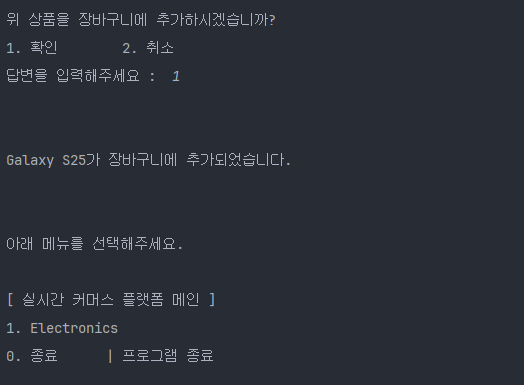
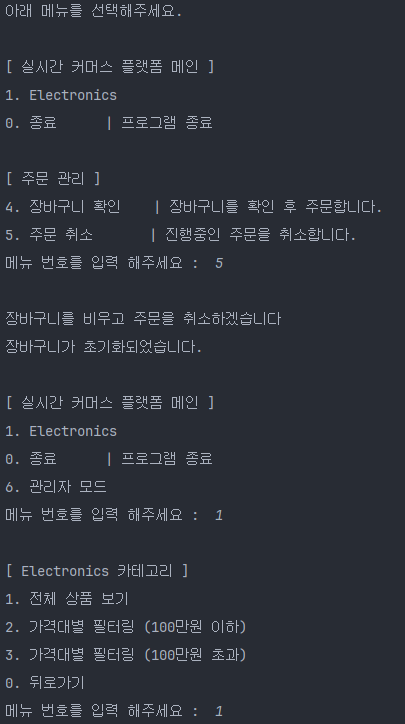
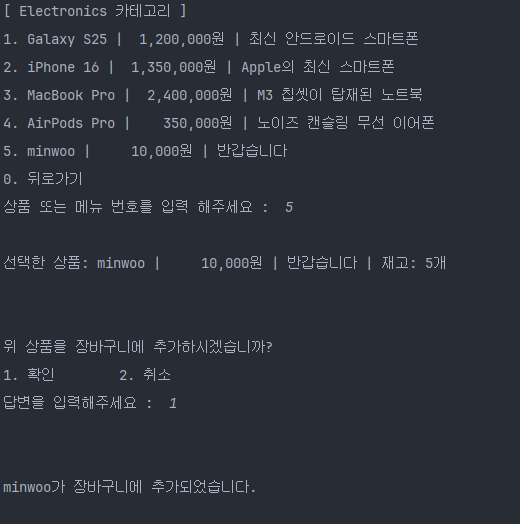
- [ ] 사용자가 선택한 상품을 장바구니에 추가할 수 있는 기능을 제공합니다.
- [ ] 장바구니는 상품명, 수량, 가격 정보를 저장하며, 항목을 동적으로 추가 및 조회할 수 있어야 합니다.
- [ ] 사용자가 잘못된 선택을 했을 경우 예외를 처리합니다(예: 유효하지 않은 상품 번호 입력)
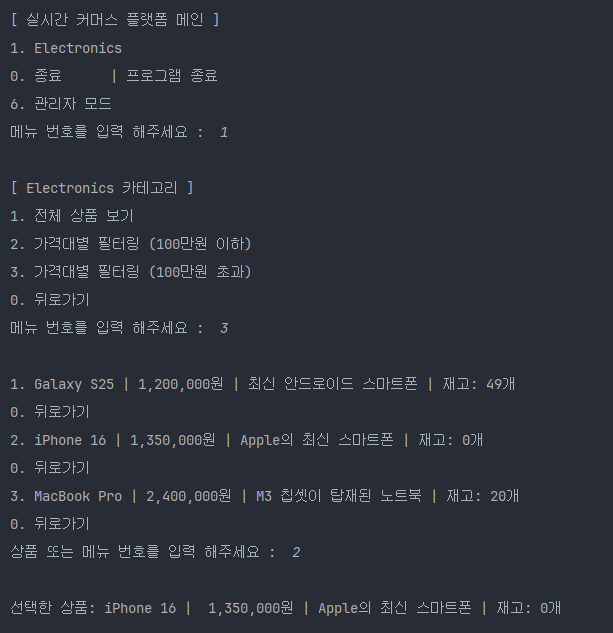
- [ ] 재고 관리 시스템
- [ ] 상품을 장바구니에 담을 때 재고를 확인하고, 재고가 부족할 경우 경고 메시지를 출력합니다.
- [ ] 주문 완료 시 해당 상품의 재고를 차감합니다.
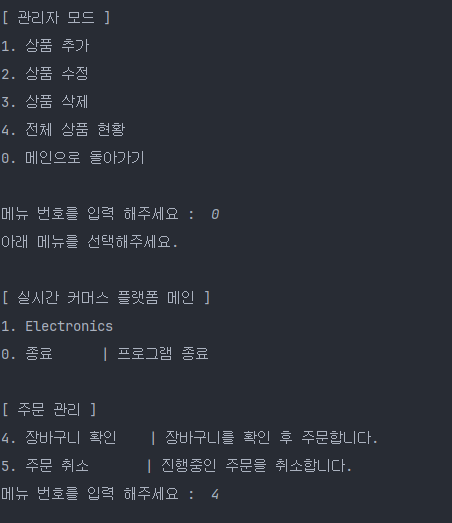
- [ ] 장바구니 출력 및 금액 계산
- [ ] 사용자가 주문을 시도하기 전에, 장바구니에 담긴 모든 상품과 총 금액을 출력합니다.
- [ ] 출력 예시
- [ ] 각 상품의 이름, 가격, 수량
- [ ] 총 금액 합계
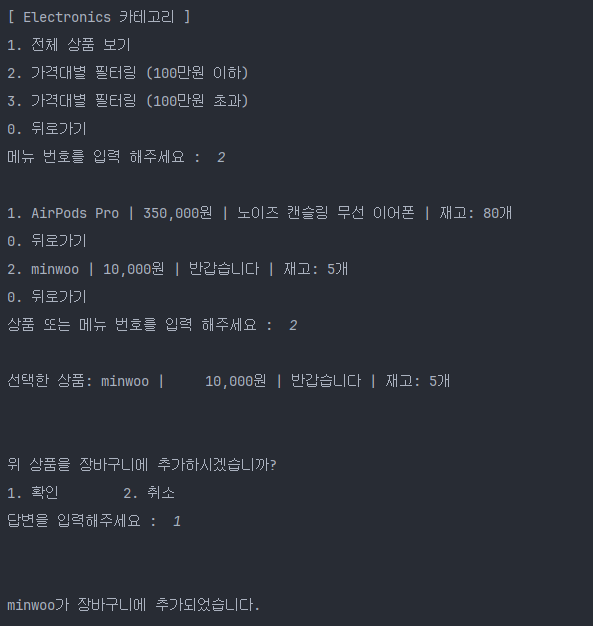
- [ ] 장바구니 담기 기능
- [ ] 상품을 선택하면 장바구니에 추가할 지 물어보고, 입력값에 따라 "추가", "취소" 처리합니다.
- [ ] 장바구니에 담은 목록을 출력합니다.
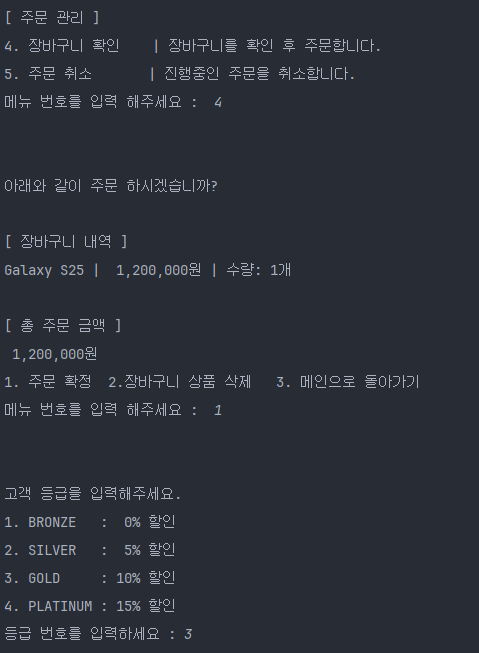
- [ ] 주문 기능
- [ ] 장바구니에 담긴 모든 항목을 출력합니다.
- [ ] 합산하여 총 금액을 계산하고, "주문하기"를 누르면 장바구니를 초기화하고 재고를 차감합니다.
LV 2. 관리자 모드 추가
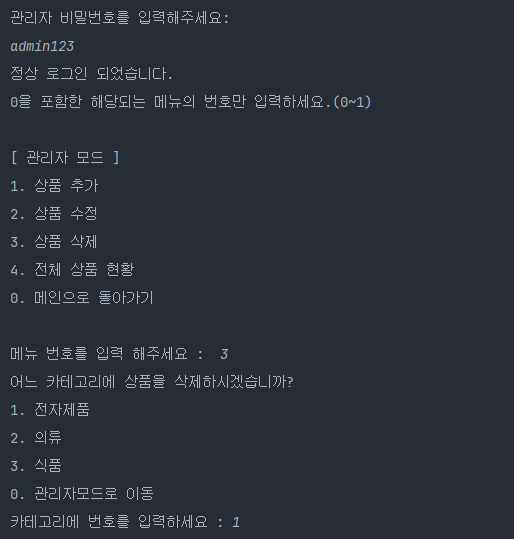
- [ ] 관리자 인증 기능
- [ ] 관리자용 비밀번호 설정 및 인증 시스템 구현
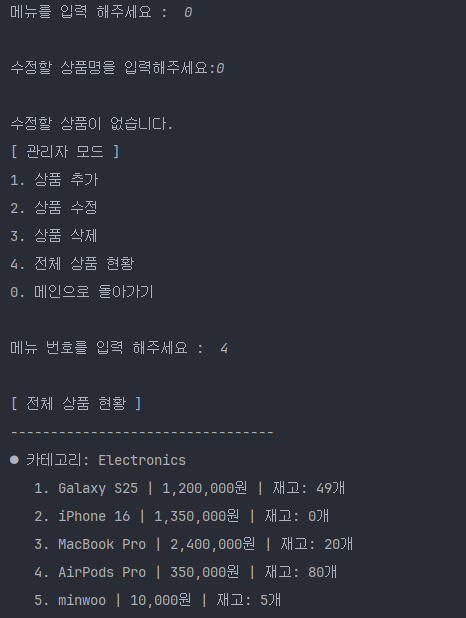
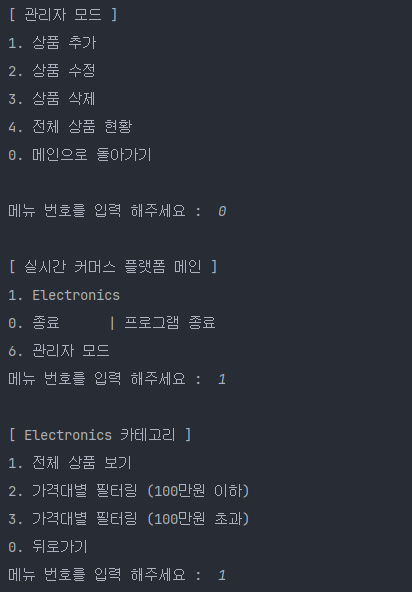
- [ ] 메인 메뉴에 "6. 관리자 모드" 옵션 추가
- [ ] 비밀번호 입력 시 3회 실패하면 메인 메뉴로 돌아가기
- [ ] 상품 추가 기능
- [ ] 새로운 상품의 정보를 입력받아 기존 카테고리에 추가
- [ ] 입력받을 정보: 상품명, 가격, 설명, 재고수량
- [ ] 카테고리 선택 후 해당 카테고리에 상품 추가
- [ ] 중복 상품명 검증 (같은 카테고리 내에서)
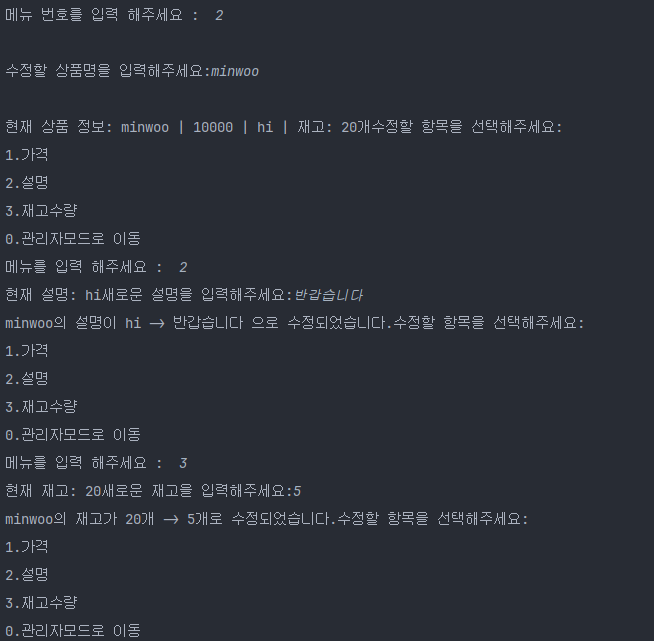
- [ ] 상품 수정 기능
- [ ] 기존 상품의 정보 수정 (가격, 설명, 재고수량)
- [ ] 상품명으로 검색하여 수정할 상품 선택
- [ ] 수정할 항목 선택 후 새로운 값 입력
- [ ] 상품 삭제 기능
- [ ] 기존 상품을 카테고리에서 제거
- [ ] 삭제 전 확인 메시지 출력
- [ ] 삭제된 상품이 장바구니에 있다면 장바구니에서도 제거
Lv 3. Enum, 람다 & 스트림을 활용한 고급 관리 기능
- [ ] Enum을 활용한 고객 등급별 할인율 관리하기
- [ ] 고객 등급의 Enum 정의 및 각 등급에 따른 할인율 적용
- [ ] 예시 : BRONZE(0%), SILVER(5%), GOLD(10%), PLATINUM(15%)
- [ ] 주문 시, 고객 등급에 맞는 할인율 적용해 총 금액 계산
- [ ] 고객 등급의 Enum 정의 및 각 등급에 따른 할인율 적용
- [ ] 람다 & 스트림을 활용한 상품 검색 및 관리 기능
- [ ] 기존에 생성한 Category의 Product를 조회 할 때 스트림을 사용하여 출력하도록 수정
- [ ] 가격대별 상품 필터링 기능을 통한 스트림 활용
- [ ] 예시 : 100만원 이하 상품만 보기, stream.filter를 활용하여 특정 가격 조건을 만족하는 상품만 출력
- [ ] 장바구니에서 특정 상품 제거 기능
- [ ] 예시 : 장바구니에 iPhone 15가 들어 있다면, stream.filter를 활용하여 특정 상품 이름을 가진 상품을 장바구니에서 제거
Main
import java.util.ArrayList;
import java.util.List;
import java.util.Scanner;

//TIP To <b>Run</b> code, press <shortcut actionId="Run"/> or
// click the <icon src="AllIcons.Actions.Execute"/> icon in the gutter.
public class Main {
    public static void main(String[] args) {
        //STEP 1. 객체 지향 설계를 적용해 상품 관리 시스템을 프로그래밍해보자
        //JAVA 프로그램을 실행하면 여러 전자제품을 출력, 제시된 상품 중 입력받은 숫자에 따라 다른 로직을 실행하는 코드를 작성합니다.
        //함수에서 Product 클래스를 생성하여 상품 목록을 추가합니다.
        //Product 객체 생성을 통해 상품명, 가격, 설명, 재고수량을 세팅합니다. [키워드: new]
        //Product클래스 생성자 (String productName, double productPrice, String productInformation, int productQuantity)
        Product GalaxyS25 = new Product("Galaxy S25",1200000,"최신 안드로이드 스마트폰",50);
        Product iPhone16 = new Product("iPhone 16",1350000,"Apple의 최신 스마트폰",0);
        Product MacBookPro = new Product("MacBook Pro",2400000,"M3 칩셋이 탑재된 노트북",20);
        Product AirPodsPro = new Product("AirPods Pro",350000,"노이즈 캔슬링 무선 이어폰",80);

        //List를 선언하여 여러 Product을 추가합니다. [List<Product> products = new ArrayList<>();]
        //CommerceSystem클래스로 이동
        List<Product> electronicsProducts = new ArrayList<>();
        electronicsProducts.add(GalaxyS25);
        electronicsProducts.add(iPhone16);
        electronicsProducts.add(MacBookPro);
        electronicsProducts.add(AirPodsPro);

        //반복문을 활용해 products를 탐색하면서 하나씩 접근합니다.
        //출력예시
        //        [ 실시간 커머스 플랫폼 - 전자제품 ]
//        1. Galaxy S25     | 1,200,000원 | 최신 안드로이드 스마트폰
//        2. iPhone 16      | 1,350,000원 | Apple의 최신 스마트폰
//        3. MacBook Pro    | 2,400,000원 | M3 칩셋이 탑재된 노트북
//        4. AirPods Pro    |   350,000원 | 노이즈 캔슬링 무선 이어폰
//        0. 종료           | 프로그램 종료
//        0 <- // 0을 입력
//
//                커머스 플랫폼을 종료합니다.
        //Product클래스 생성자 (String productName, double productPrice, String productInformation, int productQuantity)

//        System.out.println("        [ 실시간 커머스 플랫폼 - 전자제품 ]");
//        for (int index=0; index<products.size(); index++) {
//            int i = index+1;
//            System.out.println(i+"."+products.get(index));
//        }
//        System.out.println("0. 종료           | 프로그램 종료");//7칸 띄움

//        Scanner scanner = new Scanner(System.in);//입력을 받기위한 스캐너생성
//        String inputNum;//입력값 받는 변수
//        int passInputNum;
//        while (true) {
//            System.out.print("메뉴 번호를 입력 해주세요 :  ");
//            // Scanner를 사용하여 양의 정수를 입력받고 적합한 타입의 변수에 저장합니다.
//            //어떤 값이 입력될지 모르기때문에 String 타입으로 입력 받기
//            inputNum = scanner.nextLine();//입력 받기//첫번재 양의 정수를 입력받는다.
//            boolean condition = true;//입력값 검증상태를 저장하기 위해서
//
//            for (int i = 0; i < inputNum.length(); i++) {
//                char a = inputNum.charAt(i);//입력값 0번째부터 담아서 입력값을 1자리씩 검증하기 위한단계
//
//                if (a >= '0' && a <= '9') {
//                    continue;//입력값이 0부터 9사이 숫자면 통과
//                }else {
//                    condition = false;
//                    break;
//                }
//            }
//
//            if (condition == true) {
//                passInputNum = Integer.parseInt(inputNum);//검증이 끝난 문자열을 정수로 변환하여 변수에 저장
//                if(0< passInputNum && passInputNum <= products.size()) {
//                    Product product = products.get(passInputNum-1);
//                    System.out.println(product);
//                }else if(passInputNum == 0){
//                    System.out.println("         커머스 플랫폼을 종료합니다.");
//                    System.exit(0);
//                }else {//숫자이기는 하나 메뉴범위를 벗어난 번호인 경우
//                    System.out.println("0을 포함한 해당되는 메뉴의 번호만 입력하세요.(0~"+products.size()+")");
//                }
//            }else{//숫자가 아닌경우
//                System.out.println("0을 포함한 해당되는 메뉴의 번호만 입력하세요.(0~"+products.size()+")");
//            }
//        }

        //STEP 2. 객체 지향 설계를 적용해 순서 제어를 클래스로 관리하기
        //CommerceSystem 클래스 생성하기
        //설명: 커머스 플랫폼의 상품을 관리하고 사용자 입력을 처리하는 클래스입니다.
        //Product를 관리하는 리스트가 필드로 존재합니다.
        //main 함수에서 관리하던 입력과 반복문 로직은 이제 start 함수를 만들어 관리합니다.
        //List<Product> products 는 CommerceSystem 클래스 생성자를 통해 값을 할당합니다.
        //CommerceSystem 객체를 생성하고 사용하는 main 함수에서 객체를 생성할 때 값을 넘겨줍니다.
//        CommerceSystem commerceSystem = new CommerceSystem(products);//리스트 배열을 통째로 넘겨서 연결
//        commerceSystem.start();

        //STEP 3. 객체 지향 설계를 적용해 상품 카테고리와 고객 관리를 클래스 기반으로 관리하기
//        Category` 클래스 생성하기
//        설명 : Product 클래스를 관리하는 클래스입니다.
//        전자제품, 의류, 식품 등 각 카테고리 내에 여러 `Product`를 만들어 줍니다.
//        `List<Product>` 은 `CommerceSystem` 클래스가 관리하기에 적절하지 않으므로 Category 클래스가 관리하도록 변경합니다.
//        여러 상품들을 포함하는 상위 개념 '전자제품' 같은 `카테고리 이름` 필드를 갖습니다.
//        카테고리 이름을 반환하는 메서드가 구현되어야 합니다.
//        **`Customer` 클래스 생성하기**[완료]
//        설명 : 고객 정보를 관리하는 클래스입니다.
//        클래스는 `고객명`, `이메일`, `등급` 필드를 갖습니다.

        List<Category> category = new ArrayList<Category>();
        Category electronics = new Category("Electronics",electronicsProducts);
        category.add(electronics);
        //public Customer(String customerName, String customerEmail, String customerRating) 생성자 매개변수
        Customer  customer1 = new Customer("민우","minwoo@gmail.com");
        List<Customer> customers = new ArrayList<>();
        customers.add(customer1);
        CommerceSystem commerceSystem = new CommerceSystem(category,customer1,"admin123",customers);//리스트 배열을 통째로 넘겨서 연결
        commerceSystem.start();

        //**STEP 4**. 캡슐화 적용하기[이미 설계하면서 캡슐화를 셋팅하여 자동으로 완료]
        //`Product`, `Category`, `Customer` 그리고 `CommerceSystem` 클래스의 필드에 직접 접근하지 못하도록 설정합니다.
        //Getter와 Setter 메서드를 사용해 데이터를 관리합니다.

    }
}








CommerceSystem
import java.util.*;
public class CommerceSystem {
//프로그램 비즈니스 로직 클래스
//설명: 커머스 플랫폼의 상품을 관리하고 사용자 입력을 처리하는 클래스입니다.[사용자 입력][상품 관리?]
//Product를 관리하는 리스트가 필드로 존재합니다.[Product를 여기서 접근]
//main 함수에서 관리하던 입력과 반복문 로직은 이제 start 함수를 만들어 관리합니다.[CommerceSystem.start()]
//List<Product> products 는 CommerceSystem 클래스 생성자를 통해 값을 할당합니다.[main에서 생성한 List<Product> products를 CommerceSystem에 주입]
//CommerceSystem 객체를 생성하고 사용하는 main 함수에서 객체를 생성할 때 값을 넘겨줍니다.[main에서 CommerceSystem접근 하여 Product를관리]
//속성
//products를 저장할 배열 선언->카테고리가 상품을 관리로 변경
private List<Category> category;//묶어진 상자 배열을 담는 배열
private List<Product> products;//같은 카테고리의 상품을 묶는 배열
Product product;//선택한 상품이 담긴 변수
Customer customer;//고객정보 및 장바구니 담기위해서
List<Customer> customers;//고객들을 모은 배열
private String ADMIN_PASSWORD;
private boolean loggedIn = false;
//그외 필요한 클래스 변수 선언
Scanner scanner = new Scanner(System.in);//입력을 받기위한 스캐너생성
//생성자
//3.main에서 주입받은 products 객체를 받아 배열에 저장
public CommerceSystem(List<Category> category,Customer customer,String ADMIN_PASSWORD,List<Customer> customers){
this.category = category;//받아온 리스트 배열을 통째로 List<Product>에 저장
this.customer = customer;
this.ADMIN_PASSWORD = ADMIN_PASSWORD;
this.customers = customers;
}
//기능
//1.Product 접근
//2.입력과 로직을 반복하는 start
public void start(){
int categoryNumber = 0;
while(true) {//메인 반복문(가장 바깥쪽)
boolean isGobackStart = false;
//어떤 카테고리를 선택할지? 정하는곳
while (true) {//초기 출력 메뉴
//장바구니에 상품이 있는 경우
if(!customer.getProductList().isEmpty()&&loggedIn==false){//장바구니가 비어있는지 확인
System.out.println("아래 메뉴를 선택해주세요.");
System.out.println("");
System.out.println("[ 실시간 커머스 플랫폼 메인 ]");
for (int i = 0; i < category.size(); i++) {
System.out.println((i + 1) + ". " + this.category.get(i).getCategoryName());
}
System.out.println("0. 종료 | 프로그램 종료");
System.out.println("");
System.out.println("[ 주문 관리 ]");
System.out.println("4. 장바구니 확인 | 장바구니를 확인 후 주문합니다.");
System.out.println("5. 주문 취소 | 진행중인 주문을 취소합니다.");
}else if(loggedIn){//관리자 모드로 진입시
System.out.println("[ 관리자 모드 ]");
System.out.println("1. 상품 추가");
System.out.println("2. 상품 수정");
System.out.println("3. 상품 삭제");
System.out.println("4. 전체 상품 현황");
System.out.println("0. 메인으로 돌아가기");
System.out.println("");
break;
}else{//장바구니에 상품이 없는경우(최초실행시)
System.out.println("");
System.out.println("[ 실시간 커머스 플랫폼 메인 ]");
for (int i = 0; i < category.size(); i++) {
System.out.println((i + 1) + ". " + this.category.get(i).getCategoryName());
}
System.out.println("0. 종료 | 프로그램 종료");
System.out.println("6. 관리자 모드");
}
String inputNum1;//입력값 받는 변수
int passInputNum1;//검증이 끝난 입력값 저장 변수
System.out.print("메뉴 번호를 입력 해주세요 : ");
// Scanner를 사용하여 양의 정수를 입력받고 적합한 타입의 변수에 저장합니다.
//어떤 값이 입력될지 모르기때문에 String 타입으로 입력 받기
inputNum1 = scanner.nextLine();//입력 받기//첫번재 양의 정수를 입력받는다.
boolean condition = true;//입력값 검증상태를 저장하기 위해서
System.out.println("");
for (int i = 0; i < inputNum1.length(); i++) {
char a = inputNum1.charAt(i);//입력값 0번째부터 담아서 입력값을 1자리씩 검증하기 위한단계
if (a >= '0' && a <= '9') {
continue;//입력값이 0부터 9사이 숫자면 통과
} else {
condition = false;
break;
}
}
if (condition == true) {
passInputNum1 = Integer.parseInt(inputNum1);//검증이 끝난 문자열을 정수로 변환하여 변수에 저장
if (0 < passInputNum1 && passInputNum1 <= this.category.size()) {//카테고리 범위안에 숫자가 맞는지 검증
categoryNumber = passInputNum1;//통과한 입력값을 넘기기 위해 categoryNumber 저장
break;
} else if (passInputNum1 == 0) {
System.out.println("커머스 플랫폼을 종료합니다.");
System.exit(0);
}else if(passInputNum1 == 1){
}else if (!customer.getProductList().isEmpty()&&passInputNum1 == 4) {//장바구니에 상품이 있을때만 활성화 그외는 오입력처리
System.out.println("");
System.out.println("아래와 같이 주문 하시겠습니까?");
System.out.println("");
System.out.println("[ 장바구니 내역 ]");
this.customer.getProductList().stream()//준비동작
.distinct() // 중복이 있더라도 화면에는 1개만 출력하겠다.
.forEach(p -> {//상품 1개씩 돌아가면서 {}로직을 수행
long count = this.customer.getProductList().stream().filter(item -> item.equals(p)).count();//상품p와 동일한 상품의 수를 카운트해라
System.out.printf("%s | %,10d원 | 수량: %d개%n", p.getProductName(), p.getproductPrice(), count);//카운트한 재고수량을 출력
});
System.out.println("");
System.out.println("[ 총 주문 금액 ]");
System.out.printf("%,10d원", this.customer.getProductTotalPrice());//총금액 출력하기
System.out.println("");
System.out.println("1. 주문 확정 2.장바구니 상품 삭제 3. 메인으로 돌아가기");
System.out.print("메뉴 번호를 입력 해주세요 : ");
while (true) {
String inputNum5 = scanner.nextLine();//입력 받기//첫번재 양의 정수를 입력받는다.
boolean condition5 = true;//입력값 검증상태를 저장하기 위해서
System.out.println("");
System.out.println("");
for (int i = 0; i < inputNum5.length(); i++) {
char a = inputNum5.charAt(i);//입력값 0번째부터 담아서 입력값을 1자리씩 검증하기 위한단계
if (a >= '0' && a <= '9') {
continue;//입력값이 0부터 9사이 숫자면 통과
} else {
condition5 = false;
break;
}
}
if (condition5 == true) {
int passInputNum5 = Integer.parseInt(inputNum5);//검증이 끝난 문자열을 정수로 변환하여 변수에 저장
if (0 < passInputNum5 && passInputNum5 <= 3) {//카테고리 범위안에 숫자가 맞는지 검증
if(passInputNum5 == 3){
break;
}else if(passInputNum5 == 1){
String rating;
while (true) {
System.out.println("고객 등급을 입력해주세요.");
System.out.println("1. BRONZE : 0% 할인");
System.out.println("2. SILVER : 5% 할인");
System.out.println("3. GOLD : 10% 할인");
System.out.println("4. PLATINUM : 15% 할인");
System.out.print("등급 번호를 입력하세요 : ");
String inputNum14 = scanner.nextLine();//입력 받기//첫번재 양의 정수를 입력받는다.
boolean condition14 = true;//입력값 검증상태를 저장하기 위해서
System.out.println("");
for (int i = 0; i < inputNum5.length(); i++) {
char a = inputNum5.charAt(i);//입력값 0번째부터 담아서 입력값을 1자리씩 검증하기 위한단계
if (a >= '0' && a <= '9') {
continue;//입력값이 0부터 9사이 숫자면 통과
} else {
condition14 = false;
break;
}
}
if (condition14 == true) {
int passInputNum14 = Integer.parseInt(inputNum14);//검증이 끝난 문자열을 정수로 변환하여 변수에 저장
if (0 < passInputNum14 && passInputNum14 <= 4) {//카테고리 범위안에 숫자가 맞는지 검증
if (passInputNum14 == 1) {//브론즈 할인
double discountPrice = this.customer.getProductTotalPrice();//총금액 에서 할인율 구하기
this.customer.setCustomerRating(Customer.Rating.BRONZE);
rating = "BRONZE";
break;
}else if(passInputNum14 == 2){//실버 할인
this.customer.setCustomerRating(Customer.Rating.SILVER);
rating = "SILVER";
double discountPrice = this.customer.getProductTotalPrice()-(this.customer.getProductTotalPrice()*0.05);//총금액 에서 할인율 구하기
break;
}else if(passInputNum14 == 3){//골드 할인
this.customer.setCustomerRating(Customer.Rating.GOLD);
rating = "GOLD";
double discountPrice = this.customer.getProductTotalPrice()-(this.customer.getProductTotalPrice()*0.1);//총금액 에서 할인율 구하기
break;
}else if(passInputNum14 == 4){
this.customer.setCustomerRating(Customer.Rating.PLATINUM);
rating = "PLATINUM";
double discountPrice = this.customer.getProductTotalPrice()-(this.customer.getProductTotalPrice()*0.15);//총금액 에서 할인율 구하기
break;
}
}
}else{
System.out.println("메뉴 번호만 입력해주세요");
}
}
System.out.println("주문이 완료되었습니다!");
System.out.printf("할인전 금액 : %d\n", this.customer.getProductTotalPrice());
double currentRate = customer.getCustomerRating().getRate();
System.out.printf("%s등급 할인(%.2f) : -%.0f할인\n",rating,currentRate,this.customer.getProductTotalPrice()*currentRate);
System.out.printf("최종 결제 금액 : %.0f원", this.customer.getProductTotalPrice()-this.customer.getProductTotalPrice()*currentRate);//총금액 출력하기
for(Product p : this.customer.getProductList()){
int oldQuantity = p.getproductQuantity();
int newQuantity = p.setProductQuantity(1);
System.out.printf("%s의 재고가 %d개에서 -> %d개로 업데이트 되었습니다.%n",p.getProductName(),oldQuantity,newQuantity);//출력하기
}
this.customer.getProductList().clear();//장바구니 초기화
isGobackStart = true;
break;
}else if(passInputNum5==2){//장바구니 상품삭제
while(true){
System.out.print("삭제할 상품명을 입력해주세요 (0. 취소): ");
String inputNum16 = scanner.nextLine();//입력 받기
System.out.println("");
if (inputNum16.equals("0")){
System.out.println("삭제를 취소하고 이전 메뉴로 돌아갑니다.");
break;
}
boolean removed = this.customer.getProductList().removeIf(p -> p.getProductName().equals(inputNum16));
if (removed) {
System.out.println(inputNum16 + " 상품이 장바구니에서 삭제되었습니다.");
isGobackStart = true;
break;
} else {
System.out.println("장바구니에 해당 이름의 상품이 없습니다.");
}
}
if(isGobackStart==true){
break;
}
}
}
}else{
System.out.println("1과 2 둘중 하나의 번호만 입력해주세요.");
}
}
if (isGobackStart) continue;
}else if(!customer.getProductList().isEmpty()&&passInputNum1 == 5){//장바구니에 상품이 있을때만 활성화 그외는 오입력처리
System.out.println("장바구니를 비우고 주문을 취소하겠습니다");
this.customer.getProductList().clear();
System.out.println("장바구니가 초기화되었습니다.");
isGobackStart = true;
break;
}else if(passInputNum1 == 6){//초기메뉴에서 6번 선택시
System.out.println("관리자 비밀번호를 입력해주세요:");
for(int i = 0; i <= 3; i++){//패스워드 3회 오류시 메인으로 돌아가기
String inputNum6 = scanner.nextLine();
if(inputNum6.equals(this.ADMIN_PASSWORD)){
System.out.println("정상 로그인 되었습니다.");
isGobackStart = true;
loggedIn = true;
break;
}else{
if(i<3){
System.out.println("패스워드를 잘못입력 하셨습니다. 남은횟수 : "+ (3-i));
}else{
System.out.println("3회 오류 메인으로 돌아갑니다.");
isGobackStart = true;
loggedIn = false;
}
}
}
}if(!this.customer.getProductList().isEmpty()){
System.out.println("0,4,5을 포함한 해당되는 메뉴의 번호만 입력하세요.(0~" + this.category.size() +")");
System.out.println("");
}else{//숫자이기는 하나 메뉴범위를 벗어난 번호인 경우
System.out.println("0을 포함한 해당되는 메뉴의 번호만 입력하세요.(0~" + this.category.size() + ")");
System.out.println("");
}
} else {//숫자가 아닌경우
if(!this.customer.getProductList().isEmpty()){
System.out.println("0,4,5을 포함한 해당되는 메뉴의 번호만 입력하세요.(0~" + this.category.size() +")");
System.out.println("");
}else{
System.out.println("0을 포함한 해당되는 메뉴의 번호만 입력하세요.(0~" + this.category.size() + ")");
System.out.println("");
}
}
}
while(loggedIn){//관리자 모드 - 메뉴 번호를 받아서 해당 메뉴로 이동
System.out.print("메뉴 번호를 입력 해주세요 : ");
String inputNum6 = scanner.nextLine();//입력 받기//첫번재 양의 정수를 입력받는다.
boolean condition6 = true;//입력값 검증상태를 저장하기 위해서
for (int i = 0; i < inputNum6.length(); i++) {
char a = inputNum6.charAt(i);//입력값 0번째부터 담아서 입력값을 1자리씩 검증하기 위한단계
if (a >= '0' && a <= '9') {
continue;//입력값이 0부터 9사이 숫자면 통과
} else {//그외 조건은 거짓조건으로 오류문 출력
condition6 = false;
break;
}
}
if (condition6 == true) {
int passInputNum6 = Integer.parseInt(inputNum6);//검증이 끝난 문자열을 정수로 변환하여 변수에 저장
if (0 <= passInputNum6 && passInputNum6 <= 4) {//카테고리 범위안에 숫자가 맞는지 검증
if(passInputNum6 == 0){//메인으로 돌아가기
isGobackStart = true;
loggedIn = false;
break;
}else if(passInputNum6 == 1){//입력 검증 및 상품 추가 로직 구현
System.out.println("어느 카테고리에 상품을 추가하시겠습니까?");
System.out.println("1. 전자제품");
System.out.println("2. 의류");
System.out.println("3. 식품");
System.out.print("카테고리에 번호를 입력하세요 : ");
String inputNum7 = scanner.nextLine();//입력 받기//첫번재 양의 정수를 입력받는다.
System.out.println("");
boolean condition7 = true;//입력값 검증상태를 저장하기 위해서
for (int i = 0; i < inputNum7.length(); i++) {
char a = inputNum7.charAt(i);//입력값 0번째부터 담아서 입력값을 1자리씩 검증하기 위한단계
if (a >= '0' && a <= '9') {
continue;//입력값이 0부터 9사이 숫자면 통과
} else {//그외 조건은 거짓조건으로 오류문 출력
condition7 = false;
break;
}
}
if (condition7 == true) {
if (passInputNum6 == 1) {
System.out.println("[ 전자제품 카테고리에 상품 추가 ]");
System.out.print("상품명을 입력해주세요:");
String productName = scanner.nextLine();
int passProductPrice = 0;
int passProductQuantity = 0;
while (true) {
System.out.print("가격을 입력해주세요:");
String productPrice = scanner.nextLine();
boolean condition8 = true;//가격 검증상태를 저장하기 위해서
for (int i = 0; i < productPrice.length(); i++) {
char a = productPrice.charAt(i);//입력값 0번째부터 담아서 입력값을 1자리씩 검증하기 위한단계
if (a >= '0' && a <= '9') {
continue;//입력값이 0부터 9사이 숫자면 통과
} else {//그외 조건은 거짓조건으로 오류문 출력
condition8 = false;
break;
}
}
if (condition8 == true) {
passProductPrice = Integer.parseInt(productPrice);//검증이 끝난 문자열을 정수로 변환하여 변수에 저장
break;
} else {
System.out.println("상품의 가격을 양의 정수로 입력해주세요.");
}
}
System.out.print("상품 설명을 입력해주세요:");
String productInfomation = scanner.nextLine();
while (true) {
System.out.print("재고수량을 입력해주세요:");
String productQuantity = scanner.nextLine();
boolean condition8 = true;//가격 검증상태를 저장하기 위해서
for (int i = 0; i < productQuantity.length(); i++) {
char a = productQuantity.charAt(i);//입력값 0번째부터 담아서 입력값을 1자리씩 검증하기 위한단계
if (a >= '0' && a <= '9') {
continue;//입력값이 0부터 9사이 숫자면 통과
} else {//그외 조건은 거짓조건으로 오류문 출력
condition8 = false;
break;
}
}
if (condition8 == true) {
passProductQuantity = Integer.parseInt(productQuantity);//검증이 끝난 문자열을 정수로 변환하여 변수에 저장
break;
} else {
System.out.println("상품의 재고를 양의 정수로 입력해주세요.");
}
}
while (true) {//상품 추가 입력 검증및 로직 구현
System.out.printf("%s | %,10d원 | %s | 수량: %d개%n", productName, passProductPrice, productInfomation, passProductQuantity);//출력하기
System.out.println("위 정보로 상품을 추가하시겠습니까?");
System.out.println("1. 확인 2. 취소");
System.out.println("");
String initNum = scanner.nextLine();
boolean condition8 = true;//가격 검증상태를 저장하기 위해서
for (int i = 0; i < initNum.length(); i++) {
char a = initNum.charAt(i);//입력값 0번째부터 담아서 입력값을 1자리씩 검증하기 위한단계
if (a >= '0' && a <= '9') {
continue;//입력값이 0부터 9사이 숫자면 통과
} else {//그외 조건은 거짓조건으로 오류문 출력
condition8 = false;
break;
}
}
if (condition8 == true) {
Category selectedCategory = this.category.get(passInputNum6-1);
int passInputNum2 = Integer.parseInt(initNum);
if (passInputNum2 == 1) {//관리자모드 - 상품 추가 - 추가를 선택
boolean isDuplicate = false;
for (Category c : this.category) {
for(Product p : c.getProducts()) {
if(p.getProductName().equals(productName)) {
isDuplicate = true;
break;
}
}
}
if (isDuplicate) {
System.out.println("이미 존재하는 상품명입니다.");
break;
} else {
// Product 객체 생성 (생성자에 인자 전달)
Product newProduct = new Product(productName, passProductPrice, productInfomation, passProductQuantity);
// 해당 카테고리 리스트에 추가
selectedCategory.getProducts().add(newProduct);
System.out.println("상품이 성공적으로 추가되었습니다!");
isGobackStart = true;
break;
}
}else if(passInputNum2 == 2){//관리자 모드 - 상품 추가 - 취소를 선택
System.out.println("상품 추가를 취소하고 돌아갑니다.");
System.out.println("");
isGobackStart = true;
break;
}
} else {
System.out.println("상품의 재고를 양의 정수로 입력해주세요.");
}
}
break;
}
}else{
System.out.println("메뉴 번호만 입력하세요.");
}
}else if(passInputNum6 == 2){//관리자모드 - 2번 상품 수정
while (true) {//상품 수정 입력 검증및 로직 구현
System.out.println("");
System.out.print("수정할 상품명을 입력해주세요:");
String reviseProductName = scanner.nextLine();
System.out.println("");
boolean fond = false;
for (Category c : this.category) {
for(Product p : c.getProducts()) {
if(p.getProductName().equals(reviseProductName)) {
fond = true;
System.out.printf("현재 상품 정보: %s | %d | %s | 재고: %d개",p.getProductName(),p.getproductPrice(),p.getproductInformation(),p.getproductQuantity());
while(loggedIn){//관리자 모드 - 상품 수정 - 상품 이름 입력 - 찾으면 수정할 메뉴로 진입
int revisePrice = 0;
String reviseInfomation = "";
int reviseQuantity = 0;
int oldPrice = 0;
int oldQuantity = 0;
String oldInfomation = "";
System.out.println("수정할 항목을 선택해주세요:");
System.out.println("1.가격");
System.out.println("2.설명");
System.out.println("3.재고수량");
System.out.println("0.관리자모드로 이동");
System.out.print("메뉴를 입력 해주세요 : ");
String inputNum9 = scanner.nextLine();//입력 받기//첫번재 양의 정수를 입력받는다.
boolean condition9 = true;//입력값 검증상태를 저장하기 위해서
for (int i = 0; i < inputNum9.length(); i++) {
char a = inputNum9.charAt(i);//입력값 0번째부터 담아서 입력값을 1자리씩 검증하기 위한단계
if (a >= '0' && a <= '9') {
continue;//입력값이 0부터 9사이 숫자면 통과
} else {//그외 조건은 거짓조건으로 오류문 출력
condition9 = false;
break;
}
}
if (condition9 == true) {
int passInputNum9 = Integer.parseInt(inputNum9);//검증이 끝난 문자열을 정수로 변환하여 변수에 저장
if (0 <= passInputNum9 && passInputNum9 <= 3) {//카테고리 범위안에 숫자가 맞는지 검증
if(passInputNum9 == 0){//관리자 모드로 돌아가기
isGobackStart = true;
break;
} else if(passInputNum9 == 1){//상품 가격 수정
System.out.printf("현재 가격: %d",p.getproductPrice());
while(true){
System.out.print("새로운 가격을 입력해주세요:");
String inputNum10 = scanner.nextLine();//입력 받기//첫번재 양의 정수를 입력받는다.
boolean condition10 = true;//입력값 검증상태를 저장하기 위해서
for (int i = 0; i < inputNum10.length(); i++) {
char a = inputNum10.charAt(i);//입력값 0번째부터 담아서 입력값을 1자리씩 검증하기 위한단계
if (a >= '0' && a <= '9') {
continue;//입력값이 0부터 9사이 숫자면 통과
} else {//그외 조건은 거짓조건으로 오류문 출력
condition10 = false;
break;
}
}
if(condition10 == true){
revisePrice = Integer.parseInt(inputNum10);
oldPrice = p.getproductPrice();
p.setproductPrice(revisePrice);
System.out.printf("%s의 가격이 %d원 -> %d원으로 수정되었습니다.",p.getProductName(),oldPrice,p.getproductPrice());
break;
}else{//수정 가격 입력시 정수외 문자가 섞여 있는경우 오류문 출력
System.out.println("양의 정수로 이루어진 숫자만 입력해주세요.");
}
}
}else if(passInputNum9 == 2){//상품 설명 수정
System.out.printf("현재 설명: %s",p.getproductInformation());
while(true){
System.out.print("새로운 설명을 입력해주세요:");
String inputNum11 = scanner.nextLine();//입력 받기//첫번재 양의 정수를 입력받는다.
oldInfomation = p.getproductInformation();
p.setproductInformation(inputNum11);
System.out.printf("%s의 설명이 %s -> %s 으로 수정되었습니다.",p.getProductName(),oldInfomation,p.getproductInformation());
break;
}
}else if(passInputNum9 == 3){//상품 재고 수정
System.out.printf("현재 재고: %d",p.getproductQuantity());
while(true){
System.out.print("새로운 재고을 입력해주세요:");
String inputNum11 = scanner.nextLine();//입력 받기//첫번재 양의 정수를 입력받는다.
boolean condition11 = true;//입력값 검증상태를 저장하기 위해서
for (int i = 0; i < inputNum11.length(); i++) {
char a = inputNum11.charAt(i);//입력값 0번째부터 담아서 입력값을 1자리씩 검증하기 위한단계
if (a >= '0' && a <= '9') {
continue;//입력값이 0부터 9사이 숫자면 통과
} else {//그외 조건은 거짓조건으로 오류문 출력
condition11 = false;
break;
}
}
if(condition11 == true){
reviseQuantity = Integer.parseInt(inputNum11);
oldQuantity = p.getproductQuantity();
p.setproductQuantity2(reviseQuantity);
System.out.printf("%s의 재고가 %d개 -> %d개로 수정되었습니다.",p.getProductName(),oldQuantity,p.getproductQuantity());
break;
}else{//수정 가격 입력시 정수외 문자가 섞여 있는경우 오류문 출력
System.out.println("양의 정수로 이루어진 숫자만 입력해주세요.");
}
}
}
}else{//수정 메뉴에서 잘못 입력시 오류문 출력
System.out.println("1,2,3 메뉴 번호중 하나만 입력하세요");
}
}
}
break;
}
}
}
if(!fond){
System.out.println("수정할 상품이 없습니다.");
break;
}
}
break;
}else if(passInputNum6 == 3){//상품 삭제
System.out.println("어느 카테고리에 상품을 삭제하시겠습니까?");
System.out.println("1. 전자제품");
System.out.println("2. 의류");
System.out.println("3. 식품");
System.out.println("0. 관리자모드로 이동");
System.out.print("카테고리에 번호를 입력하세요 : ");
String inputNum12 = scanner.nextLine();//입력 받기//첫번재 양의 정수를 입력받는다.
System.out.println("");
boolean condition12 = true;//입력값 검증상태를 저장하기 위해서
for (int i = 0; i < inputNum12.length(); i++) {
char a = inputNum12.charAt(i);//입력값 0번째부터 담아서 입력값을 1자리씩 검증하기 위한단계
if (a >= '0' && a <= '9') {
continue;//입력값이 0부터 9사이 숫자면 통과
} else {//그외 조건은 거짓조건으로 오류문 출력
condition12 = false;
break;
}
}
if (condition12 == true){
int passInputNum12 = Integer.parseInt(inputNum12);//검증이 끝난 문자열을 정수로 변환하여 변수에 저장
if (0 <= passInputNum12 && passInputNum12 <= 3) {//카테고리 범위안에 숫자가 맞는지 검증
if(passInputNum12 == 0){//관리자 모드로 돌아가기
isGobackStart = true;
break;
} else if(passInputNum12 >=1 && passInputNum12<=3){//해당 카테고리 상품 리스트 출력 및 선택 삭제 진행
Category selectCategory = this.category.get(passInputNum12-1);
List<Product> selectProuct = selectCategory.getProducts();
if (selectProuct.isEmpty()) {
System.out.println("해당 카테고리에 등록된 상품이 없습니다.");
} else {
for (int i = 0; i < selectProuct.size(); i++) {
Product p = selectProuct.get(i);
System.out.printf("%d. %s | %,d원 | %s | 재고: %d개%n",(i + 1),p.getProductName(),p.getproductPrice(),p.getproductInformation(),p.getproductQuantity());
}
System.out.println("");
System.out.println("몇번째 상품을 삭제 하시겠습니까 : ");
while(true){
String inputNum13 = scanner.nextLine();//입력 받기
System.out.println("");
boolean condition13 = true;//입력값 검증상태를 저장하기 위해서
for (int i = 0; i < inputNum13.length(); i++) {
char a = inputNum13.charAt(i);//입력값 0번째부터 담아서 입력값을 1자리씩 검증하기 위한단계
if (a >= '0' && a <= '9') {
continue;//입력값이 0부터 9사이 숫자면 통과
} else {//그외 조건은 거짓조건으로 오류문 출력
condition13 = false;
break;
}
}
if(condition13 == true){
int passInputNum13 = Integer.parseInt(inputNum13);//검증이 끝난 문자열을 정수로 변환하여 변수에 저장
if (0 <= passInputNum13 && passInputNum13 <= selectProuct.size()) {//카테고리 범위안에 숫자가 맞는지 검증
System.out.printf("%d번 상품을 정말로 삭제 하시겠습니까 (장바구니에 담긴 해당 상품도 삭제됩니다): ",passInputNum13);
System.out.println("");
System.out.println("1. 확인 2. 취소");
while(true) {
String inputNum14 = scanner.nextLine();//입력 받기
System.out.println("");
boolean condition14 = true;//입력값 검증상태를 저장하기 위해서
for (int i = 0; i < inputNum14.length(); i++) {
char a = inputNum14.charAt(i);//입력값 0번째부터 담아서 입력값을 1자리씩 검증하기 위한단계
if (a >= '0' && a <= '9') {
continue;//입력값이 0부터 9사이 숫자면 통과
} else {//그외 조건은 거짓조건으로 오류문 출력
condition14 = false;
break;
}
}
if(condition14 == true){
int passInputNum14 = Integer.parseInt(inputNum14);//검증이 끝난 문자열을 정수로 변환하여 변수에 저장
if (0 < passInputNum14 && passInputNum14<3) {
if(passInputNum14 == 1){
String targetName = selectProuct.get(passInputNum13 - 1).getProductName();
selectProuct.remove(passInputNum13-1);
for (Customer user : this.customers) {
List<Product> cartList = user.getToCart();
for (int i = cartList.size() - 1; i >= 0; i--) {
if (cartList.get(i).getProductName().equals(targetName)) {
cartList.remove(i);
}
}
}
System.out.println("정상적으로 상품이 삭제 되었습니다.");
isGobackStart = true;
break;
}else if(passInputNum14 == 2){
System.out.println("상품 삭제를 취소 합니다.");
isGobackStart = true;
break;
}
}
}
}
}
}else{
System.out.println("범위안에 상품 번호만 입력해주세요 ");
}
break;
}
}
}
}else{//수정 메뉴에서 잘못 입력시 오류문 출력
System.out.println("1,2,3,0 메뉴 번호중 하나만 입력하세요");
}
}
}else if(passInputNum6 == 4){//상품 현황 출력
System.out.println("");
System.out.println("[ 전체 상품 현황 ]");
// 1. 모든 카테고리를 순회
for (Category c : this.category) {
System.out.println("---------------------------------");
System.out.println("● 카테고리: " + c.getCategoryName());
List<Product> productList = c.getProducts();
// 2. 카테고리 내 상품이 없는 경우
if (productList.isEmpty()) {
System.out.println(" (등록된 상품이 없습니다)");
} else {
// 3. 카테고리 내 상품들을 순회하며 출력
for (int i = 0; i < productList.size(); i++) {
Product p = productList.get(i);
System.out.printf(" %d. %s | %,d원 | 재고: %d개%n",(i + 1), p.getProductName(), p.getproductPrice(), p.getproductQuantity());
}
System.out.println("");
break;
}
}
break;
}
}
}
break;
}
if(isGobackStart){
continue;
}
boolean isGoback= false;;
boolean filterUsed = false;
//선택한 해당 카테고리의 상품목록을 불러오기
while (true) {//카테고리 진입시 - 상품필터보여주고 - 전체상품보기 하면 리스트 보여주는것으로 수정
while(true){//입력 검증및 상품 필터 로직 구현
System.out.println("[ " + this.category.get(categoryNumber - 1).getCategoryName() + " 카테고리 ]");
System.out.println("1. 전체 상품 보기");
System.out.println("2. 가격대별 필터링 (100만원 이하)");
System.out.println("3. 가격대별 필터링 (100만원 초과)");
System.out.println("0. 뒤로가기");
String inputNum15;//입력값 받는 변수
int passInputNum15;//검증이 끝난 입력값 저장 변수
System.out.print("메뉴 번호를 입력 해주세요 : ");
inputNum15 = scanner.nextLine();//입력 받기
boolean condition = true;//입력값 검증상태를 저장하기 위해서
System.out.println("");
for (int i = 0; i < inputNum15.length(); i++) {
char a = inputNum15.charAt(i);//입력값 0번째부터 담아서 입력값을 1자리씩 검증하기 위한단계
if (a >= '0' && a <= '9') {
continue;//입력값이 0부터 9사이 숫자면 통과
} else {
condition = false;
break;
}
}
if (condition == true) {
Category selectedCategory = this.category.get(categoryNumber - 1);//categoryNumber번째 카테고리 products 불러오기
passInputNum15 = Integer.parseInt(inputNum15);//검증이 끝난 문자열을 정수로 변환하여 변수에 저장
if (0 < passInputNum15 && passInputNum15 <= 3) {//해당 products의 사이즈범위내 숫자를 입력받기
if(passInputNum15 == 1){//1. 전체 상품 보기
System.out.println("[ " + this.category.get(categoryNumber - 1).getCategoryName() + " 카테고리 ]");
products = selectedCategory.getProducts();//불러온 해당 카테고리의 상품들을 products 객체에 담기
for (int index = 0; index < products.size(); index++) {//해당 객체의 범위만큼만 돌도록 하기
int i = index + 1;
System.out.println(i + ". " + products.get(index));//반복문을 통해 리스트 출력
}
System.out.println("0. 뒤로가기");
if(customer.addToCartMethod(products)){
filterUsed = true;
isGoback = true;
break;
}
}else if(passInputNum15 == 2){//2. 가격대별 필터링 (100만원 이하)
products = selectedCategory.getProducts().stream()
.filter(p -> p.getproductPrice() <= 1000000) // 조건: 가격이 1,000,000 이하인 것만!
.toList();
for (int index = 0; index < products.size(); index++) {
Product p = products.get(index);
System.out.printf("%d. %s | %,d원 | %s | 재고: %d개\n",(index+1),p.getProductName(), p.getproductPrice(), p.getproductInformation(), p.getproductQuantity());
System.out.println("0. 뒤로가기");
}
if(customer.addToCartMethod(products)){
filterUsed = true;
isGoback = true;
break;
}
break;
}else if(passInputNum15 == 3){//3. 가격대별 필터링 (100만원 초과)
products = selectedCategory.getProducts().stream()
.filter(p -> p.getproductPrice() > 1000000) // 조건: 가격이 1,000,000 초과인 것만!
.toList();
for (int index = 0; index < products.size(); index++) {
Product p = products.get(index);
System.out.printf("%d. %s | %,d원 | %s | 재고: %d개\n",(index+1),p.getProductName(), p.getproductPrice(), p.getproductInformation(), p.getproductQuantity());
System.out.println("0. 뒤로가기");
}
if(customer.addToCartMethod(products)){
filterUsed = true;
isGoback = true;
break;
}
break;
}
break;
} else if (passInputNum15 == 0) {//0이면 뒤로가기
isGoback = true;
break;
} else {//숫자이기는 하나 메뉴범위를 벗어난 번호인 경우
System.out.println("0을 포함한 해당되는 메뉴의 번호만 입력하세요.");
System.out.println("");
}
} else {//숫자가 아닌경우
System.out.println("0을 포함한 해당되는 메뉴의 번호만 입력하세요.");
System.out.println("");
}
}
if (filterUsed) {
// 이미 addToCartMethod를 마쳤으니 아래 중복 코드를 실행하지 않고
// 다시 카테고리 메뉴를 보여주거나 메인으로 나가기
if (isGoback) break; // 메인으로 나가기
continue; // 다시 필터 메뉴로 돌아가기
}
if(isGoback){
break;
}
System.out.println("[ " + this.category.get(categoryNumber - 1).getCategoryName() + " 카테고리 ]");
Category selectedCategory = this.category.get(categoryNumber - 1);//categoryNumber번째 카테고리 products 불러오기
products = selectedCategory.getProducts();//불러온 해당 카테고리의 상품들을 products 객체에 담기
for (int index = 0; index < products.size(); index++) {//해당 객체의 범위만큼만 돌도록 하기
int i = index + 1;
System.out.println(i + ". " + products.get(index));//반복문을 통해 리스트 출력
}
System.out.println("0. 뒤로가기");
String inputNum2;//입력값 받는 변수
int passInputNum;//검증이 끝난 입력값 저장 변수
System.out.print("상품 또는 메뉴 번호를 입력 해주세요 : ");
// Scanner를 사용하여 양의 정수를 입력받고 적합한 타입의 변수에 저장합니다.
//어떤 값이 입력될지 모르기때문에 String 타입으로 입력 받기
inputNum2 = scanner.nextLine();//입력 받기//첫번재 양의 정수를 입력받는다.
boolean condition = true;//입력값 검증상태를 저장하기 위해서
System.out.println("");
for (int i = 0; i < inputNum2.length(); i++) {
char a = inputNum2.charAt(i);//입력값 0번째부터 담아서 입력값을 1자리씩 검증하기 위한단계
if (a >= '0' && a <= '9') {
continue;//입력값이 0부터 9사이 숫자면 통과
} else {
condition = false;
break;
}
}
if (condition == true) {
passInputNum = Integer.parseInt(inputNum2);//검증이 끝난 문자열을 정수로 변환하여 변수에 저장
if (0 < passInputNum && passInputNum <= products.size()) {//해당 products의 사이즈범위내 숫자를 입력받기
product = products.get(passInputNum - 1);//인덱스 값으로 접근하여 선택한 상품 꺼내기
System.out.print("선택한 상품: ");//출력하기
//[문제] toString 와 특정 상품의 별개로 원하는 정보를 출력하고 싶었으나, print나 println을 안됨
//[해결]printf를 사용하여 해결
System.out.printf("%s | %,10d원 | %s | 재고: %d개%n", product.getProductName(), product.getproductPrice(), product.getproductInformation(), product.getproductQuantity());//출력하기
System.out.println("");
System.out.println("");
break;
} else if (passInputNum == 0) {//0이면 뒤로가기
isGoback = true;
break;
} else {//숫자이기는 하나 메뉴범위를 벗어난 번호인 경우
System.out.println("0을 포함한 해당되는 메뉴의 번호만 입력하세요.(0~" + products.size() + ")");
System.out.println("");
}
} else {//숫자가 아닌경우
System.out.println("0을 포함한 해당되는 메뉴의 번호만 입력하세요.(0~" + products.size() + ")");
System.out.println("");
}
}
if(isGoback == true){
continue;
}
while (true) {//장바구니 추가 로직
String inputNum3;//입력값 받는 변수
int passInputNum3;//검증이 끝난 입력값 저장 변수
System.out.printf("\"%s | %,10d원 | %s\"\n", product.getProductName(), product.getproductPrice(), product.getproductInformation());//출력하기
System.out.println("위 상품을 장바구니에 추가하시겠습니까?");
System.out.println("1. 확인 2. 취소");
System.out.print("답변을 입력해주세요 : ");
// Scanner를 사용하여 양의 정수를 입력받고 적합한 타입의 변수에 저장합니다.
//어떤 값이 입력될지 모르기때문에 String 타입으로 입력 받기
inputNum3 = scanner.nextLine();//입력 받기//첫번재 양의 정수를 입력받는다.
boolean condition3 = true;//입력값 검증상태를 저장하기 위해서
System.out.println("");
System.out.println("");
for (int i = 0; i < inputNum3.length(); i++) {
char a = inputNum3.charAt(i);//입력값 0번째부터 담아서 입력값을 1자리씩 검증하기 위한단계
if (a >= '0' && a <= '9') {
continue;//입력값이 0부터 9사이 숫자면 통과
} else {
condition3 = false;
break;
}
}
if (condition3 == true) {
passInputNum3 = Integer.parseInt(inputNum3);//검증이 끝난 문자열을 정수로 변환하여 변수에 저장
if(passInputNum3 == 1) {//1번 입력시 장바구니에 추가 하였다고 출력
if(product.getproductQuantity() <= 0){
System.out.printf("%s의 재고가 부족합니다.",product.getProductName());
System.out.println("");
break;
}
customer.addToCart(product);//주문상품을 고객클래스에 저장
System.out.printf("%s",product.getProductName());
System.out.print("가 장바구니에 추가되었습니다.");
System.out.println("");
System.out.println("");
System.out.println("");
break;
}else if(passInputNum3 == 2){//2이면 뒤로가기
break;
}else {//숫자이기는 하나 메뉴범위를 벗어난 번호인 경우
System.out.println("1과 2 둘중 하나의 번호만 입력해주세요.");
System.out.println("");
}
}else{//숫자가 아닌경우
System.out.println("1과 2 둘중 하나의 번호만 입력해주세요.");
System.out.println("");
}
}
}
}
}
Product
public class Product {
    //개별 상품 정보를 가지는 클래스
    //상품명, 가격, 설명, 재고수량
    //예시: Galaxy S24, 1200000, 최신 스마트폰, 50
    //new Product("Galaxy S24", 1200000, "최신 스마트폰", 50)

    //속성
    private String productName;
    private int productPrice;
    private String productInformation;
    private int productQuantity;

    //생성자
    public Product(String productName, int productPrice, String productInformation, int productQuantity) {
        this.productName = productName;
        this.productPrice = productPrice;
        this.productInformation = productInformation;
        this.productQuantity = productQuantity;
    }


    //기능
    //상품 수정(세터)
    public void setProductName(String productName) {
        this.productName=productName;
    }
    public void setproductPrice(int productPrice) {
        this.productPrice=productPrice;
    }
    public void setproductInformation(String productInformation) {
        this.productInformation=productInformation;
    }
    public int setproductQuantity() {
        this.productQuantity=this.productQuantity-1;
        return productQuantity;
    }
    public void setproductQuantity2(int productQuantity) {
        this.productQuantity=productQuantity;
    }
    //상품 정보 출력(게터)
    public String getProductName() {
        return productName;
    }
    public int getproductPrice() {
        return productPrice;
    }
    public String getproductInformation() {
        return productInformation;
    }
    public int setProductQuantity(int i) {
        this.productQuantity=productQuantity-i;
        return productQuantity;
    }
    public int getproductQuantity() {
        return productQuantity;
    }


    @Override
    public String toString() {//출력시 원하는 출력값을 위해서 출력 양식 설정
        return String.format("%s | %,10d원 | %s",productName, productPrice, productInformation);
    }
}
Category
import java.util.List;

public class Category {
    //Product 클래스를 관리하는 클래스
    //예시 : 전자제품, 의류, 식품 등 각 카테고리 내에 여러 Product를 포함합니다.

    //속성
    private List<Product> products;
    private String categoryName;

    //생성자
    public Category(String categoryName,List<Product> products) {
        this.products = products;
        this.categoryName = categoryName;
    }

    //기능
    public String getCategoryName() {
        return this.categoryName;
    }
    public Product getProductsItem(int i) {
        return this.products.get(i);
    }
    public List<Product> getProducts() {
        return this.products;
    }
}
Customer
import java.util.ArrayList;
import java.util.List;
import java.util.Scanner;

public class  Customer {
    //고객 정보를 관리하는 클래스
    //속성
    private String customerName;
    private String customerEmail;
    private List<Product> product =  new ArrayList<Product>();

    private Rating customerRating;//브론즈,실버,플레티넘,VIP 순서
    private double customerDiscount;

    public enum Rating{
        //enum 정의(속성)
        BRONZE(0.0),
        SILVER(0.05),
        GOLD(0.1),
        PLATINUM(0.15);

        private final double rate;

        //생성자
        Rating(double rate) {
            this.rate = rate;
        }

        //기능
        public double getRate() {
            return rate;
        }
    }

    //생성자
    public Customer(String customerName, String customerEmail) {
        this.customerName = customerName;
        this.customerEmail = customerEmail;
        this.customerRating = Rating.BRONZE;//초기 등급은 브론즈
    }

    //기능
    public String getCustomerName() {
        return customerName;
    }
    public String getcustomerEmail() {
        return customerEmail;
    }
    public Rating getcustomerRating() {
        return customerRating;
    }

    public void addToCart(Product product) {
        this.product.add(product);
    }
    public List<Product> getToCart() {
        return this.product;
    }
    public List<Product> getProductList() {
        return product;
    }
    public Product getProduct(int id) {
        return product.get(id);
    }
    public int getProductTotalPrice() {
        int totalPrice = 0;
        for (Product product : product) {
            product.getproductPrice();
            totalPrice += product.getproductPrice();
        }
        return totalPrice;
    }
    public Rating getCustomerRating() {
        return customerRating;
    }
    public void setCustomerRating(Rating rating) {
        this.customerRating = rating;
    }
    public boolean addToCartMethod(List<Product> products) {
        Scanner scanner = new Scanner(System.in);
        Product product=null;
        //장바구니 추가 로직
        boolean isGoback = false;
        while(true) {
            String inputNum2;//입력값 받는 변수
            int passInputNum;//검증이 끝난 입력값 저장 변수

            System.out.print("상품 또는 메뉴 번호를 입력 해주세요 :  ");
            // Scanner를 사용하여 양의 정수를 입력받고 적합한 타입의 변수에 저장합니다.
            //어떤 값이 입력될지 모르기때문에 String 타입으로 입력 받기
            inputNum2 = scanner.nextLine();//입력 받기//첫번재 양의 정수를 입력받는다.
            boolean condition = true;//입력값 검증상태를 저장하기 위해서
            System.out.println("");

            for (int i = 0; i < inputNum2.length(); i++) {
                char a = inputNum2.charAt(i);//입력값 0번째부터 담아서 입력값을 1자리씩 검증하기 위한단계

                if (a >= '0' && a <= '9') {
                    continue;//입력값이 0부터 9사이 숫자면 통과
                } else {
                    condition = false;
                    break;
                }
            }

            if (condition == true) {
                //트라이 캐치를 넣게되면 for문을 통한 입력검증 단계가 획기적으로 줄어들수 있다.
                try{//숫자가 아닌값이 들어온경우
                    passInputNum = Integer.parseInt(inputNum2);//검증이 끝난 문자열을 정수로 변환하여 변수에 저장
                }catch(NumberFormatException e){
                    System.out.print("숫자만 입력해주세요");
                    continue;
                }
                if (0 < passInputNum && passInputNum <= products.size()) {//해당 products의 사이즈범위내 숫자를 입력받기
                    product = products.get(passInputNum - 1);//인덱스 값으로 접근하여 선택한 상품 꺼내기
                    System.out.print("선택한 상품: ");//출력하기
                    //[문제] toString 와 특정 상품의 별개로 원하는 정보를 출력하고 싶었으나, print나 println을 안됨
                    //[해결]printf를 사용하여 해결
                    System.out.printf("%s | %,10d원 | %s | 재고: %d개%n", product.getProductName(), product.getproductPrice(), product.getproductInformation(), product.getproductQuantity());//출력하기
                    System.out.println("");
                    System.out.println("");
                    break;
                } else if (passInputNum == 0) {//0이면 뒤로가기
                    isGoback = true;
                    break;
                } else {//숫자이기는 하나 메뉴범위를 벗어난 번호인 경우
                    System.out.println("0을 포함한 해당되는 메뉴의 번호만 입력하세요.(0~" + products.size() + ")");
                    System.out.println("");
                }
            } else {//숫자가 아닌경우
                System.out.println("0을 포함한 해당되는 메뉴의 번호만 입력하세요.(0~" + products.size() + ")");
                System.out.println("");
            }
        }
        if(isGoback == true){
            return true;
        }
        while(true){
            String inputNum3;//입력값 받는 변수
            int passInputNum3;//검증이 끝난 입력값 저장 변수
            System.out.println("위 상품을 장바구니에 추가하시겠습니까?");
            System.out.println("1. 확인        2. 취소");
            System.out.print("답변을 입력해주세요 :  ");
            // Scanner를 사용하여 양의 정수를 입력받고 적합한 타입의 변수에 저장합니다.
            //어떤 값이 입력될지 모르기때문에 String 타입으로 입력 받기
            inputNum3 = scanner.nextLine();//입력 받기//첫번재 양의 정수를 입력받는다.
            boolean condition3 = true;//입력값 검증상태를 저장하기 위해서
            System.out.println("");
            System.out.println("");

            for (int i = 0; i < inputNum3.length(); i++) {
                char a = inputNum3.charAt(i);//입력값 0번째부터 담아서 입력값을 1자리씩 검증하기 위한단계

                if (a >= '0' && a <= '9') {
                    continue;//입력값이 0부터 9사이 숫자면 통과
                } else {
                    condition3 = false;
                    break;
                }
            }
            if (condition3 == true) {
                try{//숫자가 아닌값이 들어온경우
                    passInputNum3 = Integer.parseInt(inputNum3);//검증이 끝난 문자열을 정수로 변환하여 변수에 저장
                }catch(NumberFormatException e){
                    System.out.print("숫자만 입력해주세요");
                    continue;
                }
                if(passInputNum3 == 1) {//1번 입력시 장바구니에 추가 하였다고 출력
                    if(product.getproductQuantity() <= 0){
                        System.out.printf("%s의 재고가 부족합니다.",product.getProductName());
                        System.out.println("");
                        break;
                    }
                    this.addToCart(product);//주문상품을 고객클래스에 저장
                    System.out.printf("%s",product.getProductName());
                    System.out.print("가 장바구니에 추가되었습니다.");
                    System.out.println("");
                    System.out.println("");
                    System.out.println("");
                    isGoback = true;
                    break;
                }else if(passInputNum3 == 2){//2이면 뒤로가기
                    isGoback = true;
                    break;
                }else {//숫자이기는 하나 메뉴범위를 벗어난 번호인 경우
                    System.out.println("1과 2 둘중 하나의 번호만 입력해주세요.");
                    System.out.println("");
                }
            }else{//숫자가 아닌경우
                System.out.println("1과 2 둘중 하나의 번호만 입력해주세요.");
                System.out.println("");
            }
        }
        if(isGoback == true){
            return true;
        }
        return  true;
    }
}
ReadMe
프로젝트명 : 커머스 과제 : Java를 활용하여 커머스의 역할을 수행하는 콘솔 기반 커머스 구현 프로젝트입니다.

주요기능 : 상품목록 출력, 상품추가, 상품삭제, 장바구니 시스템, 관리자 시스템,프로그램을 종료할지 선택

구현목표 :
STEP1 객체 지향 설계를 적용해 상품 관리 시스템을 프로그래밍해보자
1. 상품 목록 출력
2. 상품의 정보를 가지고 있는 Product 클래스 생성하기
3. main 함수에서 Product 클래스를 생성하여 상품 목록을 추가합니다.
STEP2 객체 지향 설계를 적용해 순서 제어를 클래스로 관리하기
4. CommerceSystem 클래스 생성하기
STEP3 객체 지향 설계를 적용해 상품 카테고리와 고객 관리를 클래스 기반으로 관리하기
5. Category 클래스 생성하기
6. Customer 클래스 생성하기
STEP4 캡슐화 적용하기
7. Product, Category, Customer 그리고 CommerceSystem 클래스의 필드에 직접 접근하지 못하도록 설정합니다.
8. Getter와 Setter 메서드를 사용해 데이터를 관리합니다.
도전 기능
레벨1 장바구니 및 주문하기 기능을 추가하기
9. 장바구니 생성 및 관리 기능
10. 재고 관리 시스템
11. 장바구니 출력 및 금액 계산
12. 장바구니 담기 기능
13. 주문 기능
레벨2 관리자 모드 추가
14. 관리자 인증 기능
15. 상품 추가 기능
16. 상품 수정 기능
17. 상품 삭제 기능
레벨3 Enum, 람다 & 스트림을 활용한 고급 관리 기능
18. Enum을 활용한 고객 등급별 할인율 관리하기
19. 람다 & 스트림을 활용한 상품 검색 및 관리 기능
20. 장바구니에서 특정 상품 제거 기능

기술스택 : Java 17 실행방법 : 로컬에서 구동

classDiagram class Main {

main() }

class CommerceSystem(List<Category> category,Customer  customer,String ADMIN_PASSWORD,List<Customer> customers)
start()}

class Customer(String customerName, String customerEmail){
public boolean addToCartMethod(List<Product> products)}

class Category(String categoryName,List<Product> products){}

class Product(String productName, int productPrice, String productInformation, int productQuantity){}


Main-->CommerceSystem(Customer)-->Category-->Product
과제 진행간 느낀점이나 어려운점
[어려운점]
1.람다 스트림의 사용에 있어서 적절한 옵션 선택이 쉽지않았다.
2.ReadMe를 작성하는데, 꼭필요한 내용이 무엇인지, 부족한 내용이 무엇인지
3.if와 for문으로 원하는 곳으로 되돌아가는것이 코드가 길어지니 찾기가 힘들었다.
4.중간중간 수정으로 인한 오류코드를 찾기가 쉽지 않았다.
5.for문을 람다 스트림을 수정하기에는 for문이 좀더 간결한 부분이 있는것 같은데 데이터 처리량이 많아지면
꼭 람다 스트림이 편한건지는 좀더 공부해봐야 할것같다.
6.예외처리를 try catch로 잡는 구성이 아닌, 일반적으로 처리를 한 부분이 나중에 되서야 예외처리 항목을 보고 추가하였지만 아직 개발자로서 예외발생 부분을 캐치 하는 부분이 쉽지 않다.
[느낀점]
1.CommerceSystem에서 start()메서드 안에 로직을 메서드화 하여 좀더 기능을 분리하여 작성하였으면,
수정해야할 부분을 빠르게 찾고(유지보수) 가독성을 올릴수 있지 않았나 싶다.
2.람다 스트림 사용이 아직 서툰것 같아 좀더 개념정리가 필요할것 같다.
3.시간이 촉박하다는 이유로 기능서만 보고 작업만 주로 하였는데, 1개 구현시 계속해서 콘솔을 돌려 테스트를 해보면서 구현을 하였으면, 좀더 유연하게 개발할수 있었을것 같다.
하나의 큰 카테고리를 완성하고 테스트를 하는식으로 했더니, 유기적으로 맞물려 있다보니, 오류 수정이 쉽지 않았다.
4.사소한 문법오류, 예를들어 ; 빼먹은 부분때문에, 몇번 찾기를 반복하였다. 앞전에도 사소한 문법오류를 내지 않기로 다짐했지만,
쉽지 않았다.
'spring_2기[본캠프] > 과제' 카테고리의 다른 글
| [달리기반 과제] 4회차 과제 (0) | 2025.12.23 |
|---|---|
| [라이브 코딩테스트] (0) | 2025.12.23 |
| [과제] 커머스2-2 (필수기능 완료 + 도전레벨2) (0) | 2025.12.19 |
| [과제] 커머스2-1 (필수기능 완료 + 도전레벨1) (0) | 2025.12.18 |
| [과제] 커머스1(필수기능 완료) (0) | 2025.12.17 |